The Agentic Data Stack is an open-source, composable architecture for agentic analytics: connect AI agents directly to your data, wherever you store it.
You can run the stack on your laptop with Docker and begin querying your data in less than a minute:
1git clone https://github.com/ClickHouse/agentic-data-stack && cd agentic-data-stack && ./scripts/prepare-demo.sh && docker compose up -d
Find more detail in the getting started section below.
Why the Agentic Data Stack? #
The traditional analytics workflow in the Enterprise requires multiple steps and handovers. A business user asks a question, a ticket gets raised, an analyst produces a dashboard, and the question gets answered a week later. AI allows the user to skip the process and answer their questions immediately.
That's the promise of the Agentic Data Stack - an open-source, composable architecture that connects AI agents directly to your data. No dashboards. No ticket queues. No waiting around. Just a conversation with your data, grounded in real-time facts, with full observability into every interaction.
A key design principle of the Open Source Agentic Data Stack is data sovereignty. You own everything:
- Your data stays local: ClickHouse runs on your infrastructure, not a third-party service
- Your conversations are private: LibreChat stores everything in your MongoDB instance
- Your traces are yours: Langfuse writes to your ClickHouse instance, not an external SaaS
- Your model choice: Frontier models are available from a wide variety of supported providers, gateways, and custom endpoints, as well as locally hosted models via tools like Ollama or vLLM
- Your MCP servers: Connect to any MCP server you’d like, not just ClickHouse. LibreChat supports adding custom MCP servers via the
librechat.yamland on-the-fly from within the user interface
The Agentic Data Stack architecture #
The Agentic Data Stack is an open-source reference architecture built on three pillars:
| Layer | Component | Role |
|---|---|---|
| Chat | LibreChat | A modern, provider-agnostic agentic chat interface |
| Data | ClickHouse + MCP | The world's fastest analytical database, exposed to agents via our open-source clickhouse-mcp server |
| Observability | Langfuse | Full LLM tracing, evaluation, and prompt management to ensure your agents are effective in their roles and can be quantifiably improved over time |
Each layer is best-in-class, fully open-source, and independently useful. Together, they form something greater than the sum of its parts: an end-to-end platform where AI agents can query billions of rows in just a couple of moments, automatically generate and tailor interactive visualizations to your specifications, provide useful, shareable insights into your data, and be continuously monitored for output quality - all without users having to write a single line of SQL.
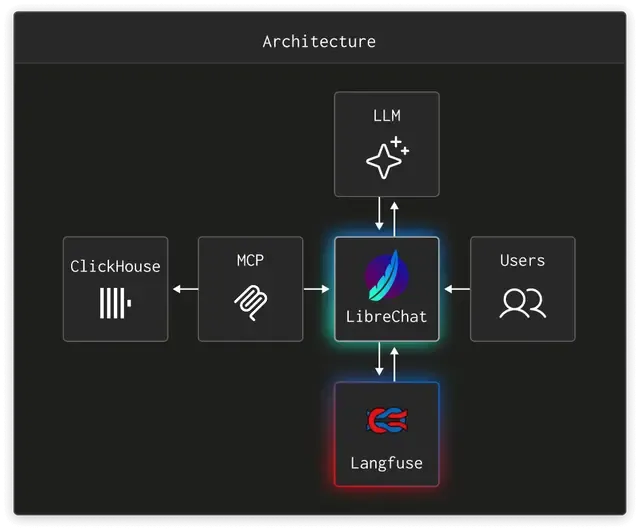
LibreChat #
LibreChat is the front door. It provides a familiar, ChatGPT-style UI that supports multiple LLM providers simultaneously. Users can switch between providers and models mid-conversation, create specialized agents for different datasets or use cases, utilize modern agentic tools like web search and multimodal upload, tweak provider-specific model parameters for things like verbosity and effort, and share conversations and artifacts across their team.
But LibreChat isn't just a chat window. It supports:
- MCP server connections: agents can discover and use tools at runtime
- Artifacts: charts, tables, and visualizations generated inline
- RAG: retrieval-augmented generation backed by pgvector for document-grounded answers
- Agent capabilities: code execution, web search, file search, OCR, and chaining
In this stack, LibreChat is pre-configured to connect to the ClickHouse MCP server, so the moment you open a conversation, your agent already has access to your data.
ClickHouse MCP #
The ClickHouse MCP server is the critical middleware that makes agentic analytics possible. In this setup, it implements the Model Context Protocol over HTTP, exposing ClickHouse's capabilities as tools that any LLM can invoke.
When an agent needs to answer a data question, the flow looks like this:
- The User asks a question in LibreChat: "What were our top 10 customers by revenue last quarter?"
- The LLM reasons about the question and decides it needs to query the database
- The LLM calls the MCP server’s
run_select_querytool, which translates the request into a ClickHouse SQL query - ClickHouse executes the query at sub-second speed across billions of rows
- The results flow back through MCP to the LLM, which formats them into a human-readable answer - optionally with a beautifully rendered chart or table if Artifacts are enabled for the conversation
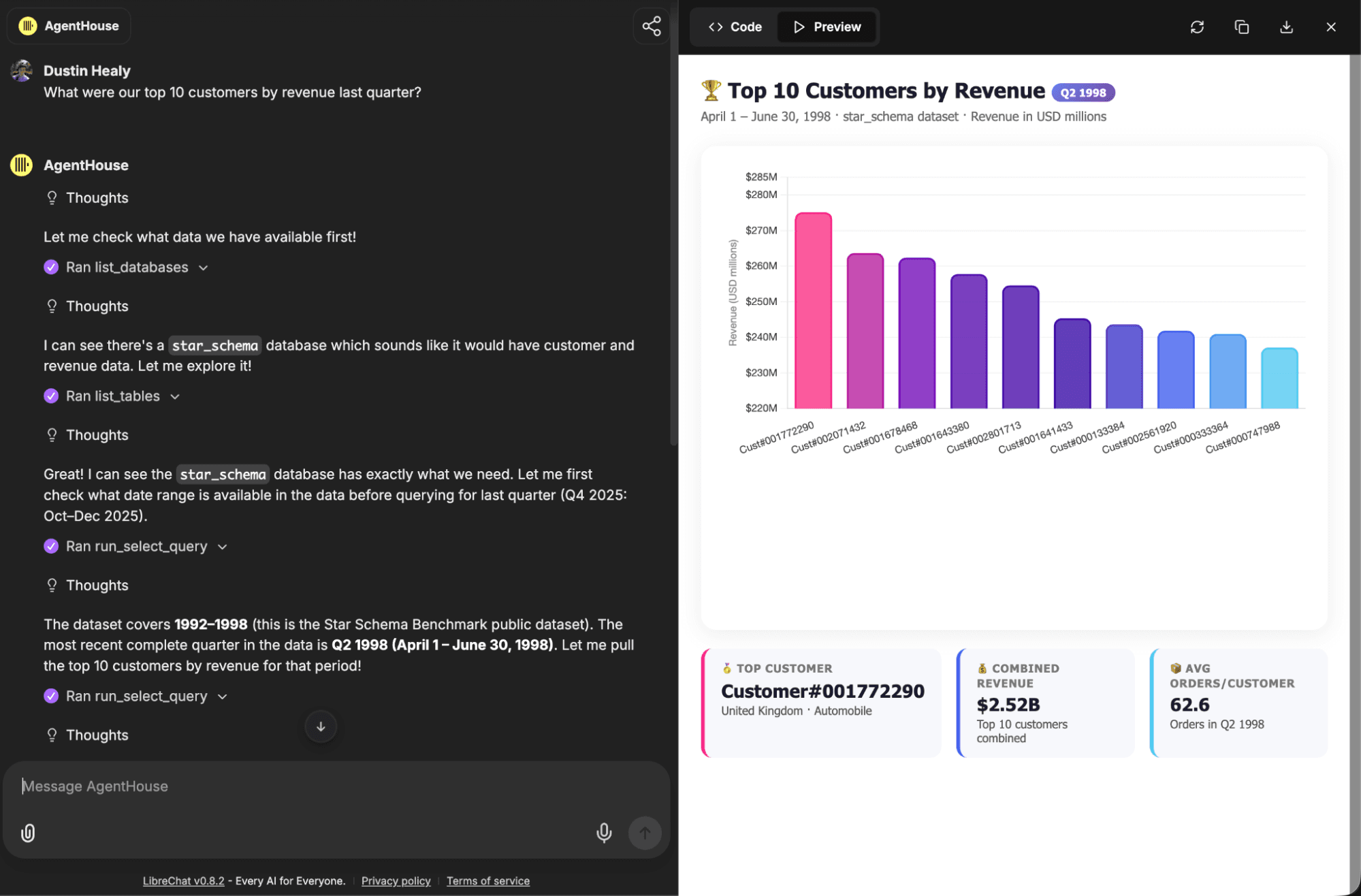
The MCP server runs as a lightweight HTTP service, authenticated via bearer token, and connects to ClickHouse over its native HTTP interface. In the Docker Compose setup, it's wired to the same ClickHouse instance that Langfuse uses by default, but you can point it at any ClickHouse deployment, including ClickHouse Cloud, either via the librechat.yaml configuration file or through the MCP Settings UI.
Langfuse #
Every LLM call LibreChat makes is traced in Langfuse. This gives you:
- Full trace visualization: see the entire chain of prompts, tool calls, and responses for any conversation
- Cost and latency monitoring: track spend across providers and models
- Quality evaluation: score outputs with custom metrics, detect hallucinations, and run automated evals
- Prompt management: version and test prompts before deploying them to production
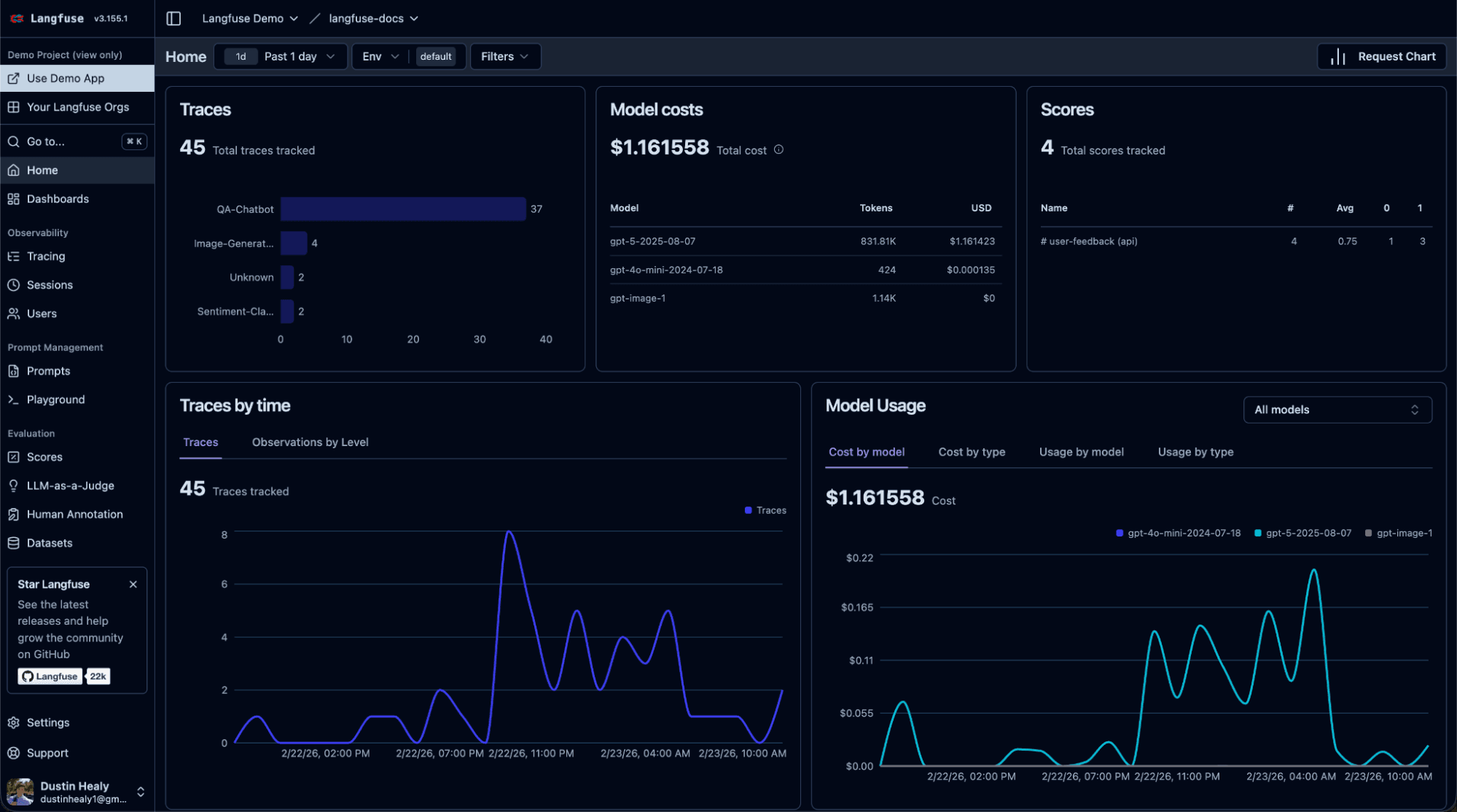
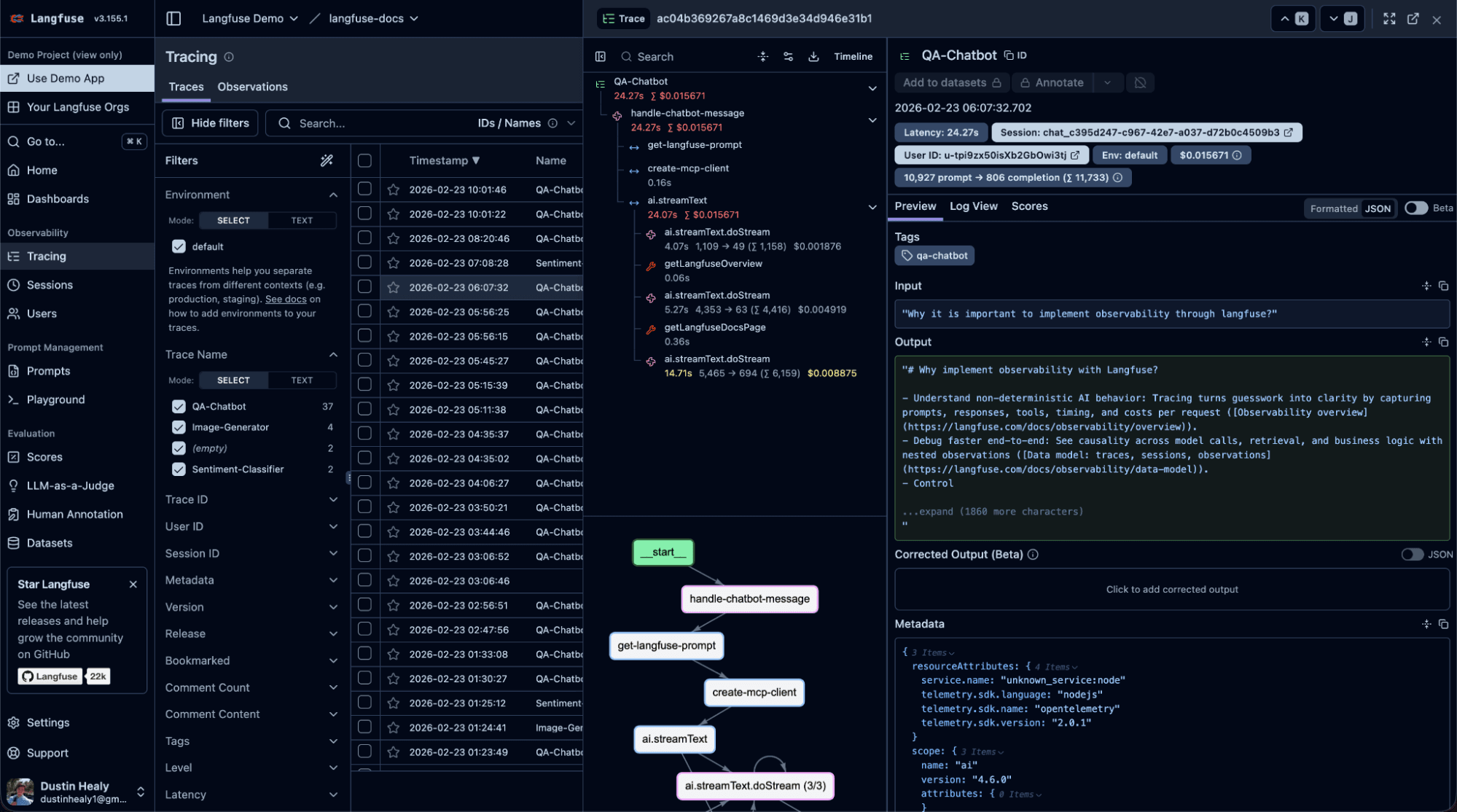
Langfuse is pre-configured in this stack with auto-provisioned project keys, so tracing starts working the moment you boot up. Open Langfuse at localhost and you'll see every interaction flowing through in real time.
Why now? #
1. LLMs got good enough to write SQL #
Modern foundation models can reliably translate natural language into complex analytical queries. They understand joins, window functions, CTEs, and time-series aggregations. When grounded with schema metadata, table comments, and a strong system prompt, they are able to reach an output quality that far exceeds that of the average non-technical business user.
2. The proliferation of the Model Context Protocol #
The Model Context Protocol (MCP) gives LLMs a standardized way to interact with external systems. Instead of building custom integrations for every database, API, and tool, MCP provides a single interface in a format designed for agentic interaction. The ClickHouse MCP server lets any MCP-compatible client like LibreChat, Claude Desktop, Cursor, or your own application query ClickHouse through tool calls derived from natural language.
This is a fundamental shift. MCP turns your database from a passive data store into an agent-facing resource: something AI agents can discover, explore, and query autonomously.
3. The maturation of LLM observability tooling #
LLM-powered applications are non-deterministic. The same prompt can produce different responses. In production, anecdotal reports from your users as to the agent or model’s efficacy aren’t nearly robust enough data to make real business decisions. You need to trace every prompt, tool call, and response. You need to score outputs for quality, monitor costs and latency, and detect regressions before users do. ClickHouse's acquisition of Langfuse (January 2026) brought the leading open-source LLM observability platform into the stack. Langfuse itself runs on ClickHouse under the hood, handling the high-volume writes and fast analytical queries that AI observability demands.
Who’s using it? #
Organizations are already using the Agentic Data Stack to transform how they work with data:
Shopify runs LibreChat internally with near-universal adoption and thousands of custom agents connected to 30+ internal MCP servers. As CEO Tobi Lutke noted publicly: "Shopify runs an internal fork of LibreChat, and we merge most everything back. I highly recommend other companies give this project a look for their internal LLM system."
Canva built a multi-agent customer support experience using Langfuse for observability, prompt management, and evaluation, enabling both engineers and non-technical team members to iterate on AI quality across a wide variety of evaluation metrics.
cBioPortal, the cancer genomics research platform, built cBioAgent on the stack, enabling researchers to ask entirely new questions about cancer genomics and treatment trajectories through natural language.
Khan Academy uses Langfuse to build and operate Khanmigo, their AI tutor for over 150 million registered learners. As one of Langfuse's first enterprise customers, adoption spread to over 100 users across 11 teams, with senior leadership, engineers, and support teams all relying on traces for decisions, debugging, and incident investigation.
Daimler Truck uses an internal deployment of LibreChat which has enabled employees to create over 3,000 custom AI agents for tasks ranging from manufacturing support to specialized data retrieval since its company-wide debut.
Fetch built their FAST product on ClickHouse with agentic analytics at its core, calling it "the future of data interaction."
SumUp, a global fintech company serving over 4 million merchants, deployed AI-powered first-level merchant support with Langfuse providing end-to-end tracing and prompt management across their complex multi-market, multi-language LLM interactions.
We use the stack internally at ClickHouse via DWAINE (Data Warehouse AI Natural Expert), an agent that now handles roughly 70% of data warehouse queries for over 200 internal users, processing 33 million LLM tokens per day.
Getting Started #
The fastest way to experience the Agentic Data Stack is to run it locally in Docker:
1git clone https://github.com/ClickHouse/agentic-data-stack && cd agentic-data-stack && ./scripts/prepare-demo.sh && docker compose up -d
That's it. Navigate to http://localhost:3080 for LibreChat, http://localhost:3000 for Langfuse, and start asking your data questions.
The prepare-demo.sh script handles the tedious parts: ingesting LLM-provider API keys, generating random passwords, JWT secrets, encryption keys, MCP auth tokens, and wiring all the services together. You can customize the initial user credentials by passing environment variables when first generating the .env file or editing them in the .env file manually after it has been generated:
1USER_EMAIL="analyst@company.com" USER_PASSWORD="secure-password" USER_NAME="Data Team" ./scripts/prepare-demo.sh
Or try the hosted demo at AgentHouse to chat with public datasets running on the ClickHouse playground and get a taste of what the Agentic Data Stack can do for you.