At ClickHouse, we are constantly thinking about our getting started experience. ClickHouse is a complex and powerful piece of software that introduces new concepts for many, which can lead to mistakes. In this post, we highlight the most common 13 mistakes we see our new users encounter, why they occur and the correct approach.
For users encountering challenges managing ClickHouse at scale, ClickHouse Cloud automatically handles many of the common getting-started and subsequent scaling challenges.
This error will often be experienced when inserting data and will be present in ClickHouse logs or in a response to an INSERT request. To understand this error, users need to understand the concept of a part in ClickHouse.
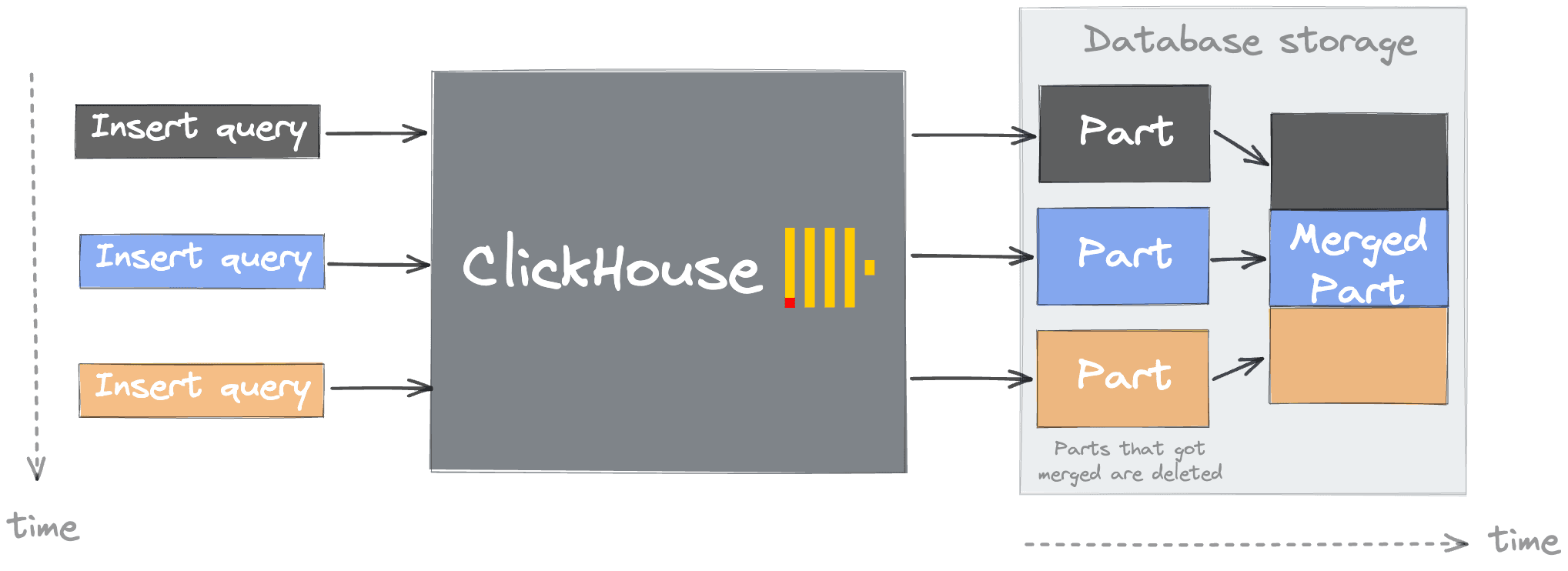
A table in ClickHouse consists of data parts sorted by the user's specified primary key (by default, the ORDER BY clause on table creation but see Index Design for the details). When data is inserted in a table, separate data parts are created, and each of them is lexicographically sorted by primary key. For example, if the primary key is (CounterID, Date), the data in the part is sorted first by CounterID, and within each CounterID value by Date. In the background, ClickHouse merges data parts for more efficient storage, similar to a Log-structured merge tree. Each part has its own primary index to allow efficient scanning and identification of where values lie within the parts. When parts are merged, then the merged part's primary indexes are also merged.
As the number of parts increases, queries invariably will slow as a result of the need to evaluate more indices and read more files. Users may also experience slow startup times in cases where the part count is high. The creation of too many parts thus results in more internal merges and "pressure" to keep the number of parts low and query performance high. While merges are concurrent, in cases of misuse or misconfiguration, the number of parts can exceed internal configurable limits (parts_to_throw_insert, max_parts_in_total). While these limits can be adjusted, at the expense of query performance, the need to do so will more often point to issues with your usage patterns. As well as causing query performance to degrade, high part counts can also place greater pressure on ClickHouse Keeper in replicated configurations.
So, how is it possible to have too many of these parts?
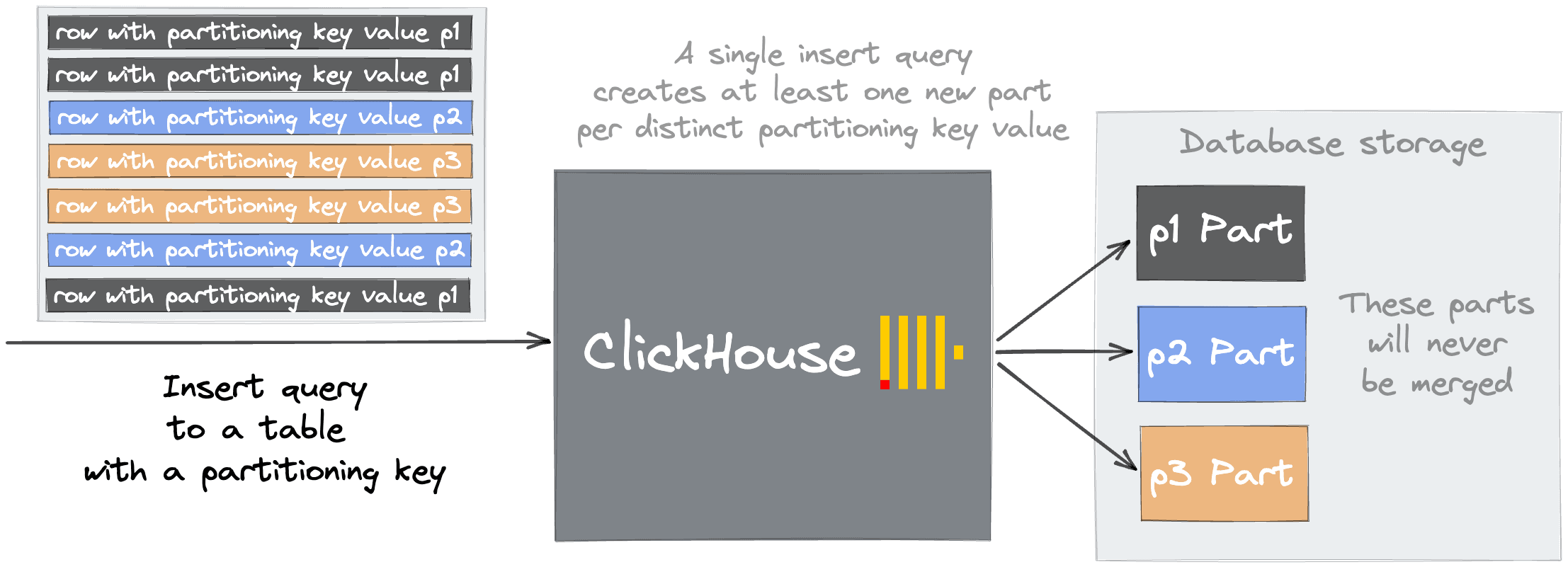
A common reason is using a partition key with excessive cardinality. On creating a table, users can optionally specify a column as a partition key by which data will be separated. A new file system directory will be created for every key value. This is typically a data management technique, allowing users to cleanly separate data logically in a table. Operations such as DROP PARTITION subsequently allow fast deletion of data subsets. This powerful feature can, however, easily be misused, with users interpreting it as a simple optimization technique for queries.
Importantly, parts belonging to different partitions are never merged. If a key of high cardinality, e.g., date_time_ms, is chosen as a partition key then parts spread across thousands of folders will never be merge candidates - exceeding preconfigured limits and causing the "Too many inactive parts (N). Parts cleaning are processing significantly slower than inserts" error on subsequent INSERTs. Addressing this problem is simple: choose a partition key with cardinality < 1000.
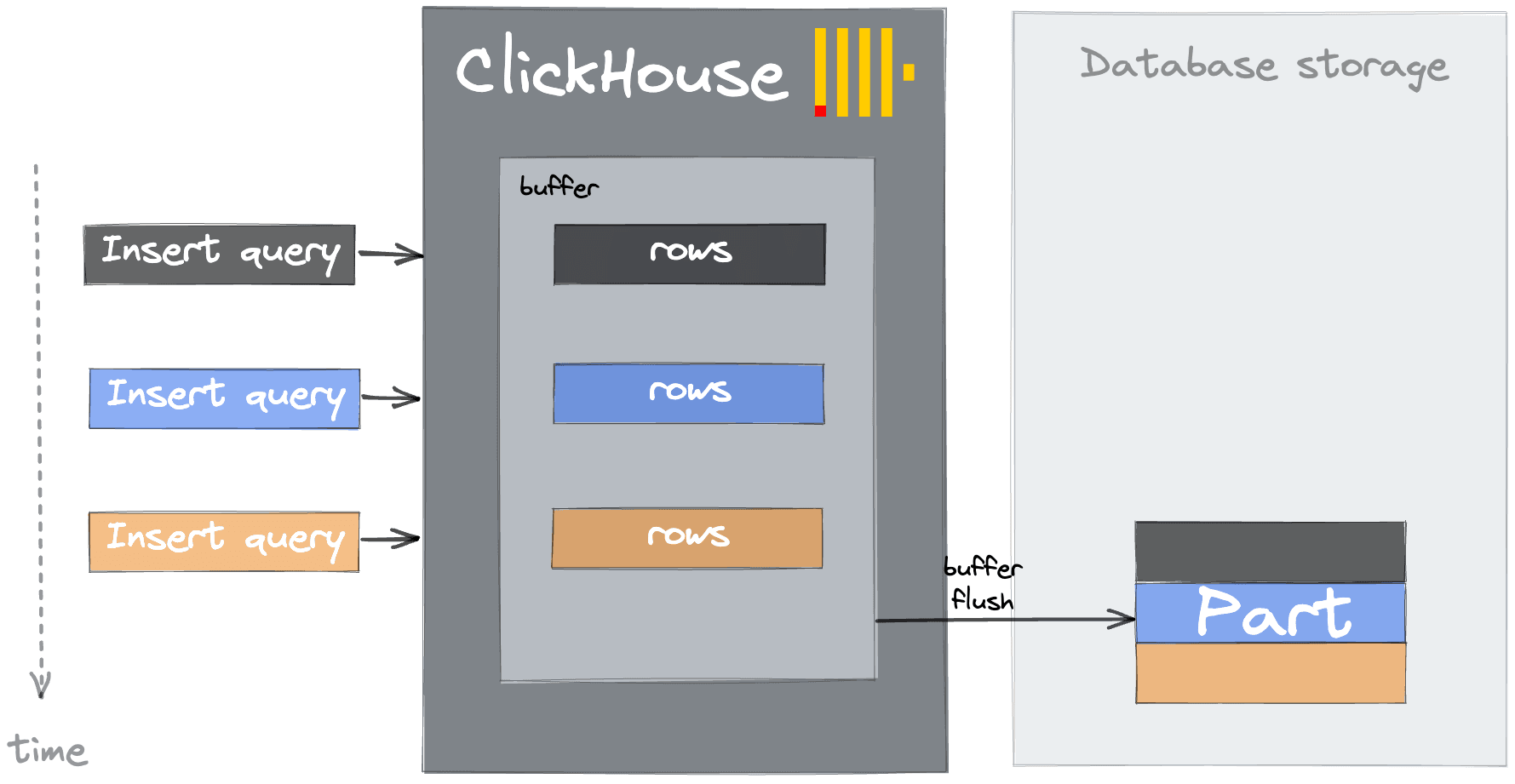
As well as the poor selection of a partition key, this issue can manifest itself as a result of many small inserts. Each INSERT into ClickHouse results in an insert block being converted to a part. To keep the number of parts manageable, users should therefore buffer data client-side and insert data as batches - at a minimum 1,000 rows per insert, although batch sizes of 10,000 to 100,000 rows are optimal. If client-side buffering is not possible, users can defer this task to ClickHouse through async inserts. In this case, ClickHouse will buffer inserts in memory before flushing them as a single batched part into the underlying table. The flush is triggered when a configurable threshold is met: a buffer size limit (async_insert_max_data_size, default 1MB), a time threshold (async_insert_busy_timeout_ms, default 1 second), or a maximum number of queued queries (async_insert_max_query_number, default 100). Since data is held in memory until flush, it is important to set wait_for_async_insert=1 (the default) so that the client receives acknowledgement only after data has been safely written to disk, avoiding silent data loss in the event of a server crash before a flush.
Buffer tables exist as a legacy alternative. Their unique advantage is that data is queryable while still in the buffer, before flush to the destination table. However, Buffer tables have significant drawbacks: they are not replicated, are not compatible with FINAL or SAMPLE, and can lose data on abnormal server restarts. In ClickHouse Cloud with SharedMergeTree, each node maintains independent buffer state, adding further complexity. For nearly all use cases, async inserts are the recommended approach. Buffer tables should only be considered in rare scenarios where querying in-buffer data before flush is a hard requirement.
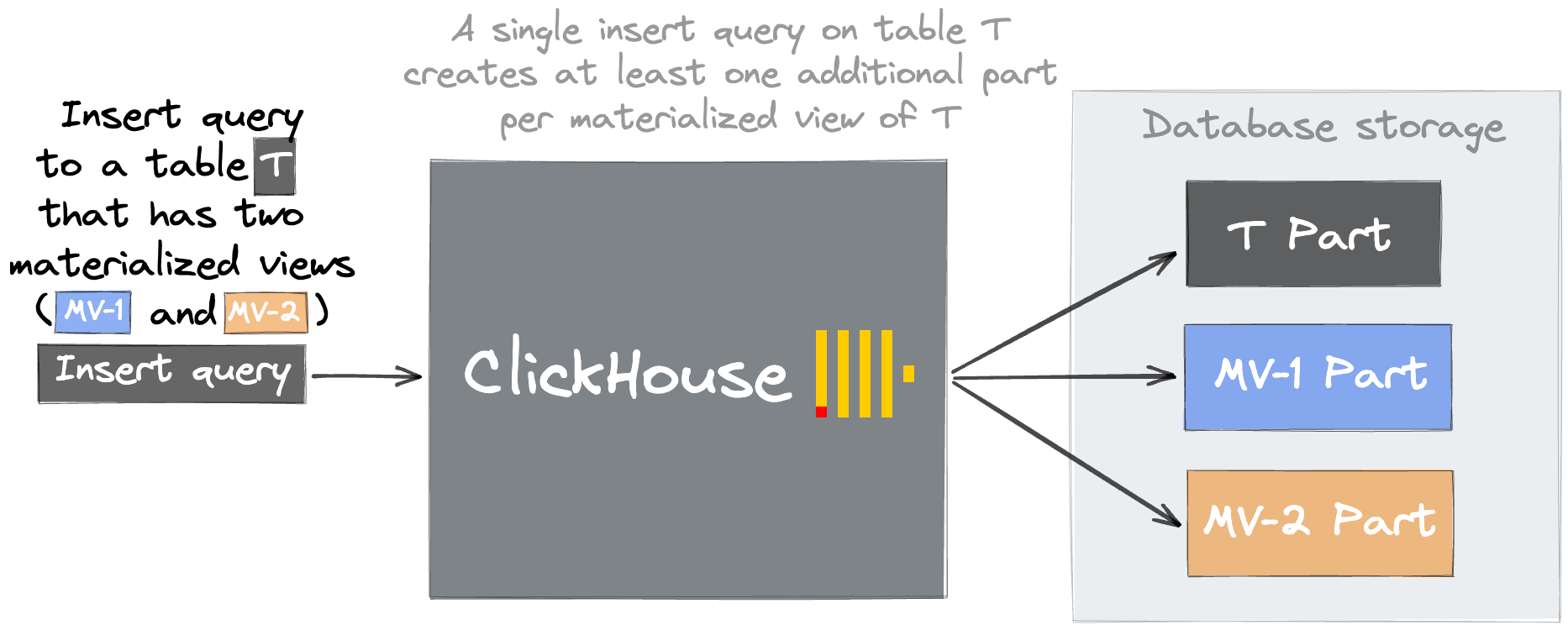
Other possible causes of this error are excessive materialized views. Materialized views are, in effect, a trigger that runs when a block is inserted into a table. They transform the data e.g., through a GROUP BY, before inserting the result into a different table. This technique is often used to accelerate certain queries by precomputing aggregations at INSERT time. Users can create these materialized views, potentially resulting in many parts. Generally, we recommended that users create views while being aware of the costs and consolidate them where possible.
The above list is not an exhaustive cause of this error. For example, mutations (as discussed below) can also cause merge pressure and an accumulation of parts. Finally, we should note that this error, while the most common, is only one manifestation of the above misconfigurations. For example, users can experience other issues as a result of a poor partitioning key. These include, but are not limited to, "no free inodes on the filesystem", backups taking a long time, and delays on replication (and high load on ClickHouse Keeper).
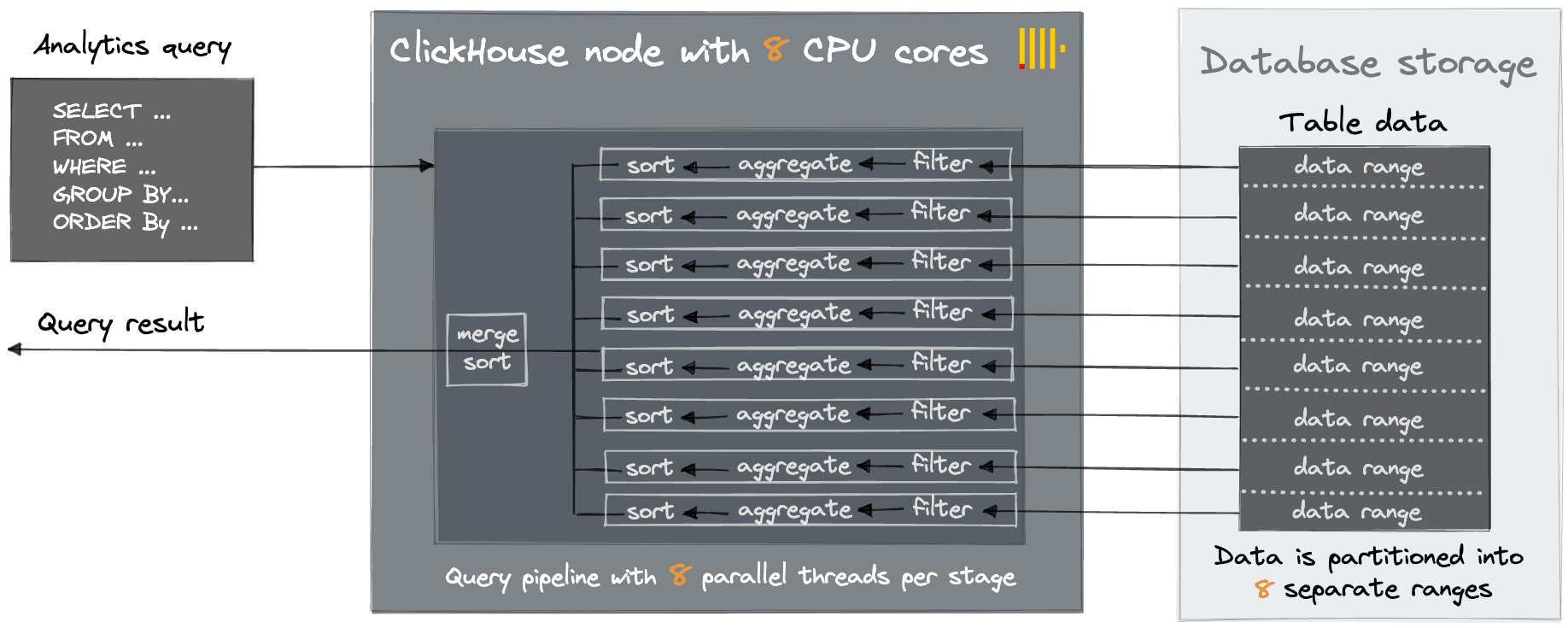
We often have new self-managed users asking us to provide recommendations around orchestration and how to scale to dozens, if not hundreds, of nodes. While technologies such as Kubernetes have made the deployment of multiple instances of stateless applications relatively simple, this pattern should, in nearly all cases, not be required for ClickHouse. Unlike other databases, which may be restricted to a machine size due to inherent limits, e.g., JVM heap size, ClickHouse was designed from the ground up to utilize the full resources of a machine. We commonly find successful deployments with ClickHouse deployed on servers with hundreds of cores, terabytes of RAM, and petabytes of disk space. Most analytical queries have a sort, filter, and aggregation stage. Each of these can be parallelized independently and will, by default, use as many threads as cores, thus utilizing the full machine resources for a query.
Scaling vertically first has a number of benefits, principally cost efficiency, lower cost of ownership (with respect to operations), and better query performance due to the minimization of data on the network for operations such as JOINs. Of course, users need redundancy in their infrastructure, but two machines should be sufficient for all but the largest use cases.
ClickHouse Cloud supports both vertical scaling (increasing replica size) and horizontal scaling (adding more replicas), with its compute-storage separation architecture (SharedMergeTree) making both approaches seamless. For details on scaling options, see the Cloud scaling documentation. We strongly recommend considering vertical scaling first, before horizontal. In summary, go vertical before going horizontal!
Get started today
For users encountering challenges managing ClickHouse at scale, ClickHouse Cloud automatically handles many of the common getting-started and subsequent scaling challenges.
While rare in OLAP use cases, the need to modify data is sometimes unavoidable. ClickHouse performs best on immutable data, and any design pattern which requires data to be updated post-insert should be reviewed carefully. That said, ClickHouse provides two mechanisms for modifying data in place:
Classic mutations via ALTER TABLE ... UPDATE — these rewrite entire data parts and are suited to infrequent, bulk changes.
Lightweight updates via UPDATE powered by patch parts — these write only the changed column values as compact delta parts, making them far more efficient for frequent or targeted updates.
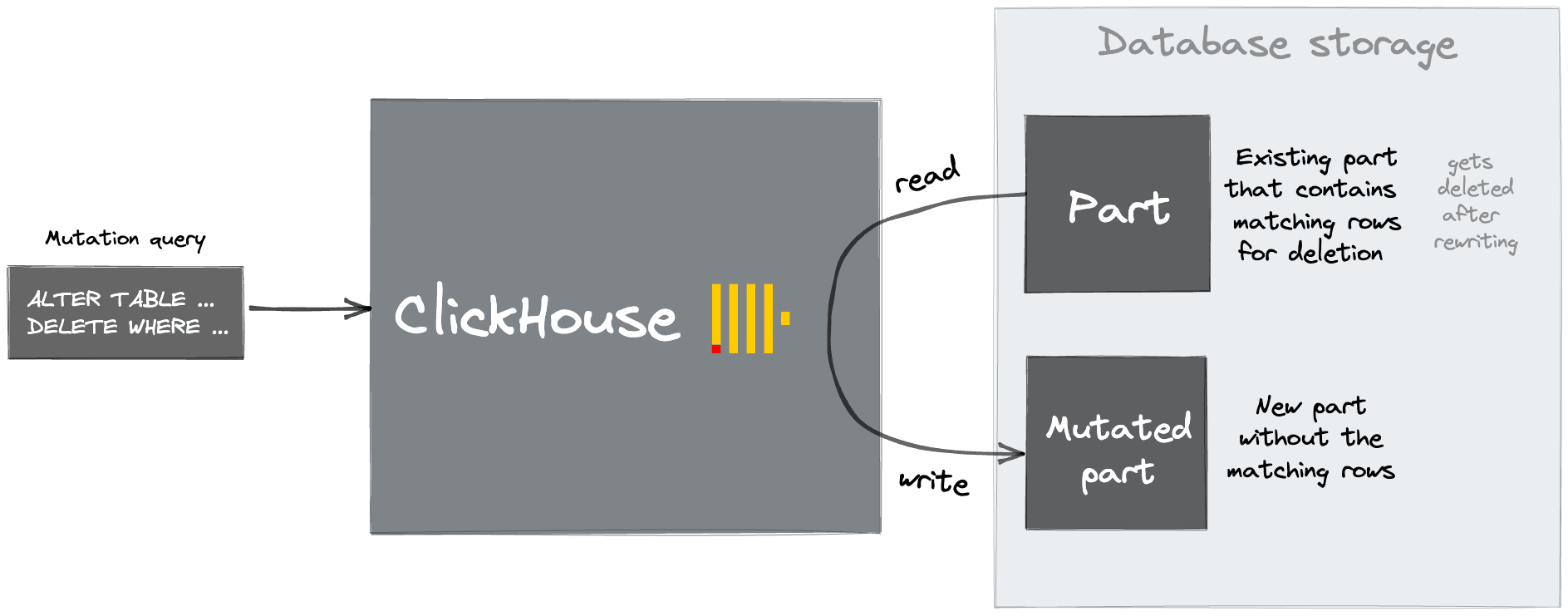
Classic mutations work by rewriting whole data parts containing the affected columns. This process relies on the same thread pool as merges. In self-managed replicated environments, each replica must apply the mutation independently. For this reason, mutations are both CPU and IO-intensive and should be scheduled cautiously with permission to run limited to administrators. Resource pressure as a result of mutations manifests itself in several ways. Typically, normally scheduled merges accumulate, which in turn causes our earlier "too many parts" issue. Furthermore, users may experience replication delays. The system.mutations table should give administrators an indication of currently scheduled mutations. Note that mutations can be cancelled, but not rolled back, with the KILL MUTATION query.
Lightweight updates take a fundamentally different approach. Instead of rewriting entire data parts, a lightweight update creates a small, compact "patch part" containing only the changed column values and metadata to locate the affected rows. These patches are applied on-the-fly during reads (so changes are visible immediately) and materialized efficiently during regular background merges — piggybacking on work ClickHouse is already doing. This can be up to 1,000× faster than classic mutations for many workloads. The same mechanism can be used for deletes, which set a _row_exists = 0 mask via a patch part rather than rewriting columns. For a deep dive into how patch parts work, see our series on fast UPDATEs in ClickHouse: Part 1 — purpose-built engines and Part 2 — SQL-style updates.
In ClickHouse Cloud, tables use the SharedMergeTree engine, which stores data in shared object storage with metadata coordinated through ClickHouse Keeper. This architecture changes the mutation picture: since replicas don't communicate directly with each other and all data lives in shared storage, mutations don't need to be independently applied on each replica — the rewritten parts are written to shared storage and become visible to all replicas through metadata updates. This leads to faster mutation execution and eliminates the replication delays that self-managed clusters can experience during heavy mutation workloads. Both classic mutations and lightweight updates with patch parts are available in ClickHouse Cloud.
We often see users needing to schedule merges as a result of duplicate data. Typically we suggest users address this issue upstream and deduplicate prior to insertion into ClickHouse. If this is not possible, users have a number of options: deduplicate at query time or utilize a ReplacingMergeTree.
Deduplicating at query time can be achieved by grouping the data on the fields, which uniquely identify a row, and using the argMax function with a date field to identify the last value for other fields. ReplacingMergeTree allows rows with the same sorting key (ORDER BY key) to be deduplicated on merges. Note this is "best effort" only: sometimes parts will not be merged with the merge process scheduled at non-deterministic intervals. It, therefore, does not guarantee the absence of duplicates. Users can also utilize the FINAL modifier to force this deduplication at SELECT time. While FINAL does add overhead, it has received significant performance improvements in recent versions including multi-threaded processing, and is suitable for many production workloads.
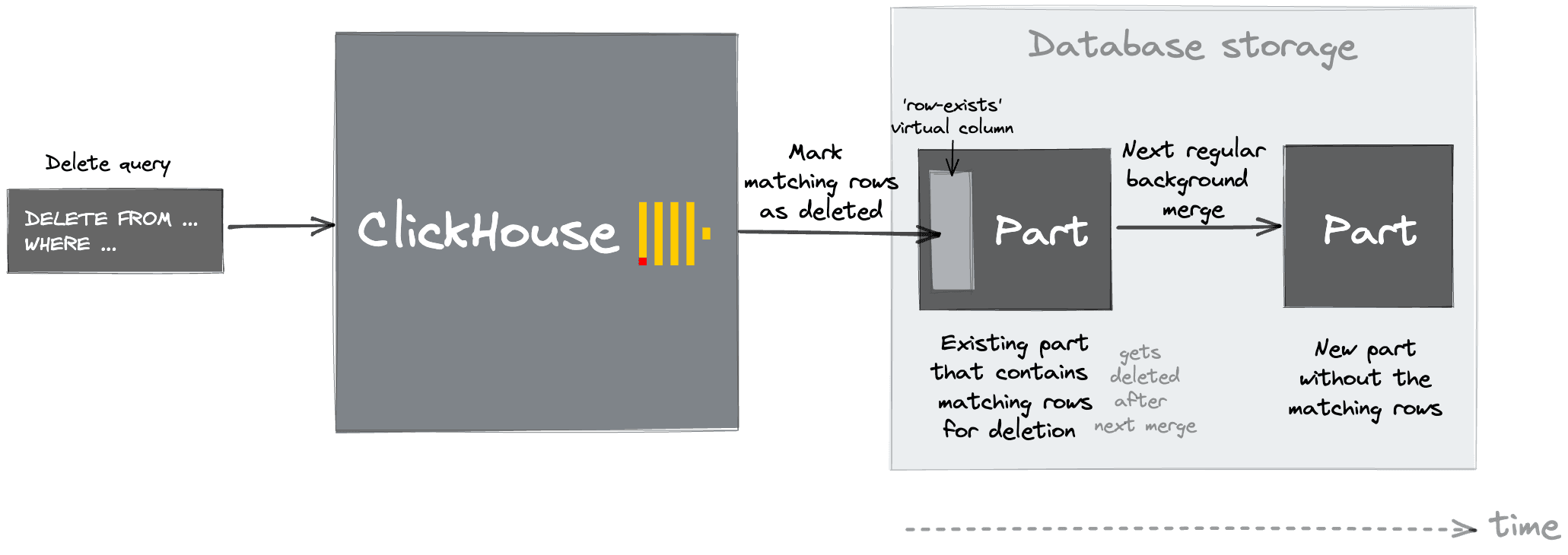
In the case where data needs to be deleted from ClickHouse e.g., for compliance or deduplication reasons, users can also utilize lightweight deletes instead of mutations. These take the form of a DELETE statement which accepts WHERE clause to filter rows. This marks rows as deleted only. These marks will be used to filter rows out at query time and will be removed when parts are merged.
Lightweight deletes are a production-ready feature and are more efficient than using a mutation in most cases, with the exception of if you are doing a large-scale bulk delete. Note that lightweight deletes are not currently compatible with tables that have projections.
4. Working with complex and semi-structured data #
As well as supporting the usual primitive types, ClickHouse has rich support for complex types such as Nested, Tuple, Map, and JSON. The general principle is simple: if you know your data structure, explicitly defined columns will always give you the best compression, insert performance, and query speed. But when your data is genuinely semi-structured or schema-evolving, ClickHouse's native JSON type is purpose-built for the job.
ClickHouse provides a native JSON data type built to optimise storage and processing of JSON data. Under the hood, ClickHouse stores JSON paths as dedicated subcolumns — transparently flattening your JSON into real columns with full compression and vectorized processing.
JSON subcolumns can be used in sorting key expressions and data-skipping indexes, enabling the same query optimizations available to regular columns.
That said, the JSON type is not a substitute for schema design. For columns with a known, stable structure, explicit column definitions will always provide the best performance. The right approach is to use explicit columns for the parts of your data you understand, and the JSON type for the parts that are genuinely dynamic.
We often see users reaching for the Nullable type, which allows columns to store a Null value. Under the hood, this creates a separate column of UInt8 type. This additional column has to be processed every time a user works with a Nullable column. This leads to additional storage space used and almost always negatively affects performance.
In most cases, we recommend to avoid using Nullable columns entirely. Instead, use a default value that represents a Null, e.g., an empty string for String columns.
New users to ClickHouse are often surprised by ClickHouse's deduplication strategy. This usually occurs when identical inserts appear to not have any effect. For example, consider the following:
Notice that, in the example above, 8 rows were inserted, but only 4 rows are shown by the SELECT. A new user might be surprised by the result here. This behavior is the result of the replicated_deduplication_window setting.
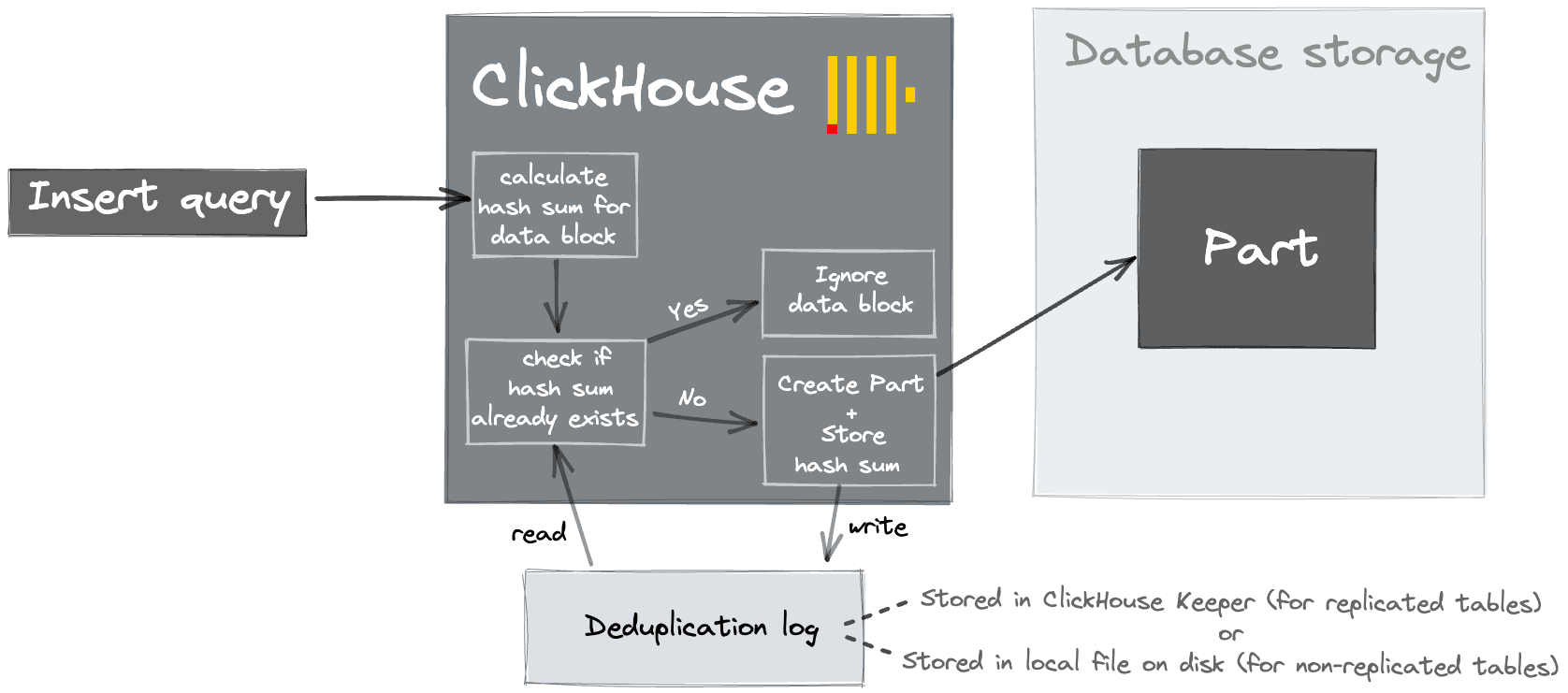
When data is inserted into ClickHouse, it creates one or more blocks (parts). In replicated environments, such as ClickHouse Cloud, a hash is also written in ClickHouse Keeper. Subsequent inserted blocks are compared against these hashes and ignored if a match is present. This is useful since it allows clients to safely retry inserts in the event of no acknowledgement from ClickHouse e.g., because of a network interruption. This requires blocks to be identical i.e., the same size with the same rows in the same order. These hashes are stored for only the most recent 100 blocks, although this can be modified. Note higher values will slow down inserts due to the need for more comparisons.
This same behavior can be enabled for non-replicated instances via the setting non_replicated_deduplication_window. In this case, the hashes are stored on a local disk.
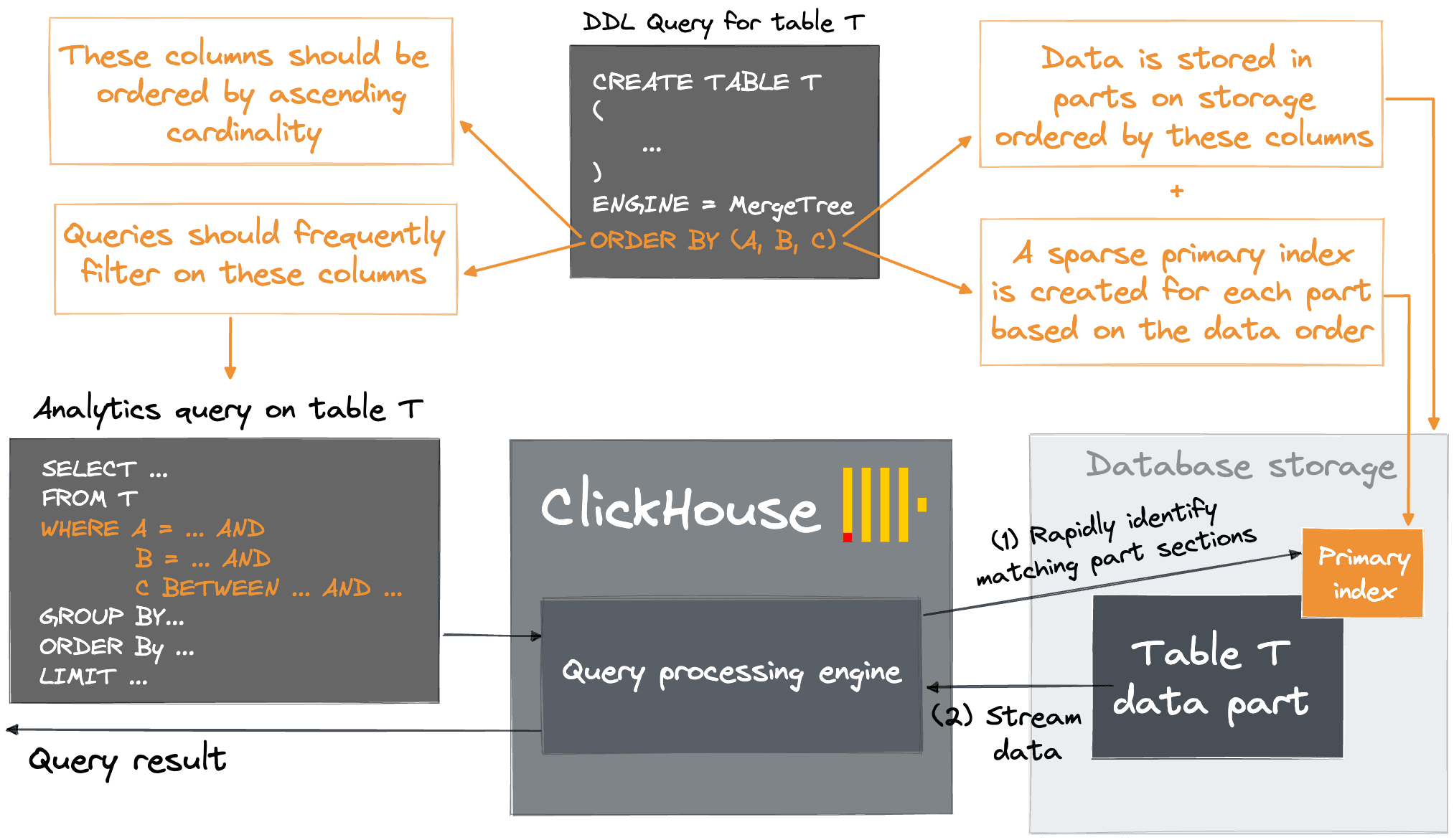
Users new to ClickHouse often struggle to fully understand its primary key concepts. Unlike B(+)-Tree-based OLTP databases, which are optimized for fast location of specific rows, ClickHouse utilizes a sparse index designed for millions of inserted rows per second and petabyte-scale datasets. In contrast to OLTP databases, this index relies on the data on disk being sorted for fast identification of groups of rows that could possibly match a query - a common requirement in analytical queries. The index, in effect, allows the matching sections of part files to be rapidly identified before they are streamed into the processing engine. For more detail on the layout of the data on disk, we highly recommend this guide.
The effectiveness of this approach, for both query performance and compression, relies on the user selecting good primary key columns via the ORDER BY clause when creating a table. In general, users should select columns for which they will often filter tables with more than 2 to 3 columns rarely required. The order of these columns is critical and can affect the compression and filtering by columns other than the first entry. For both the efficient filtering of secondary key columns in queries and the compression ratio of a table's column files, it is optimal to order the columns in a primary key by their cardinality in ascending order. A full explanation of the reasoning can be found here.
Get started today
For users encountering challenges managing ClickHouse at scale, ClickHouse Cloud automatically handles many of the common getting-started and subsequent scaling challenges.
Primary keys are rightly the first tool users turn to when needing to accelerate queries. However, tables are limited to a single primary key, and query access patterns can render this ineffective i.e., for diverse use cases, queries which cannot exploit the primary key efficiently are inevitable. In these cases ClickHouse can be forced to perform a full table scan of each column when applying a WHERE clause condition. Often this will still be sufficiently fast, but in some cases users reach for data skipping indices, hoping to accelerate these queries easily.
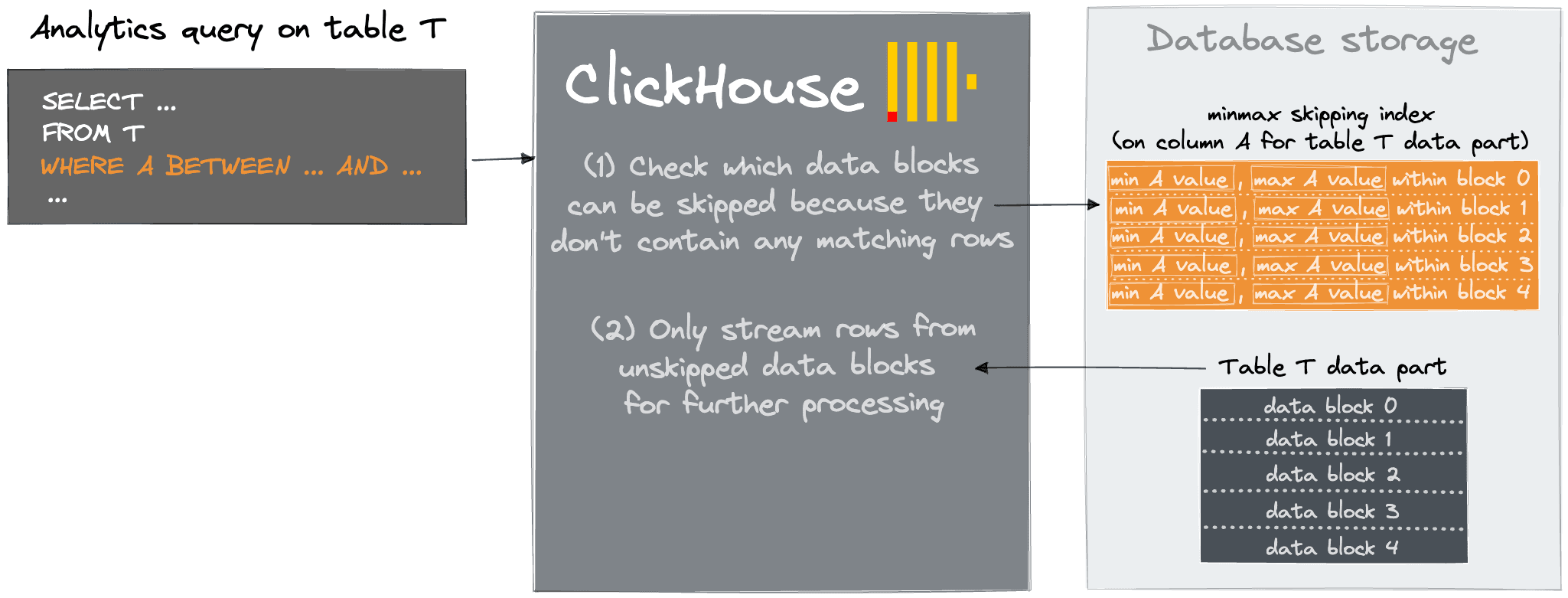
These indices add data structures which allow ClickHouse to skip reading significant chunks of data that are guaranteed to have no matching values. More specifically, they create an index over blocks granules (effectively marks) allowing these to be skipped if the WHERE clause is not satisfied.
In most cases skip indices should only be considered once other alternatives have been exhausted - specifically this advanced functionality should only be used after investigating other alternatives such as modifying the primary key, using projections, or materialized views. In general, only consider skip-indices if there is a strong correlation between the primary key and the targeted, non-primary column/expression. In the absence of any real correlation, the skipping index will match for most blocks - resulting in all granules being read into memory and evaluated. In this case, the index cost has been incurred for no benefit, effectively slowing the full table scan.
9. LIMIT doesn't always short circuit + point lookups #
We often find OLTP users new to ClickHouse reaching for the LIMIT clause to optimize queries by limiting the number of results returned. If coming from an OLTP database this should intuitively optimize queries: less data returned = faster result, surely? Yes and no.
The effectiveness of this technique depends on whether the query can be run entirely in a streaming fashion. Some queries, such as SELECT * FROM table LIMIT 10 will scan only a few granules of the first few parts before reaching 10 results and returning the result to the user. This is also true for cases where the user orders the SELECT by a primary key field due to the optimize_read_in_order setting defaulting to 1. However, if the user runs SELECT a from table ORDER BY b LIMIT N, whereby the table is ordered by a and not by b, ClickHouse cannot avoid reading the entire table i.e., no early termination of the query is possible.
For aggregations, things are a little more complex. A full table scan is also required unless the user is grouping by the primary key and sets optimize_aggregation_in_order=1. In this case, a propagation signal is sent once sufficient results are acquired. Provided previous steps of the query are capable of streaming the data, e.g., filter, then this mechanism will work, and the query will terminate early. Normally, however, an aggregation must consume all table data before returning and applying the LIMIT as the final stage.
As an example, we create and load the table from our UK Property Price Paid tutorial with 27.55 million rows. This dataset is available within our play.clickhouse.com environment.
With optimize_aggregation_in_order=0 this aggregation query, that is grouping by the primary keys, performs a full table scan before applying the LIMIT 1 clause:
We also see even experienced users being caught by less obvious LIMIT behavior in multi-node environments where a table has many shards. Sharding allows users to split or replicate their data across multiple instances of ClickHouse. When a query with a LIMIT N clause is sent to a sharded table e.g. via a distributed table, this clause will be propagated down to each shard. Each shard will, in turn, need to collate the top N results, returning them to the coordinating node. This can prove particularly resource-intensive when users run queries that require a full table scan. Typically these are "point lookups" where the query aims to just identify a few rows. While this can be achieved in ClickHouse with careful index design a non-optimized variant, coupled with a LIMIT clause, can prove extremely resource-intensive.
In self-managed replicated environments, tables can unexpectedly become read-only when a node loses its connection to the coordination service. When this happens, the affected node can no longer participate in replication and will reject writes until the connection is restored. The most common causes are under-resourcing of the coordination service — hosting it on the same machine as ClickHouse in production, or allocating insufficient memory and CPU. This is usually resolved by ensuring the coordination service runs on dedicated hardware with adequate resources.
ClickHouse Keeper is the recommended coordination service for self-managed deployments. It is purpose-built for ClickHouse, written in C++ (so no JVM tuning is required), and offers better compatibility with ClickHouse's metadata patterns than ZooKeeper. For deployments still running ZooKeeper, migrating to ClickHouse Keeper is recommended.
This issue does not affect ClickHouse Cloud, where coordination is fully managed.
As a new user, ClickHouse can often seem like magic - every query is super fast, even on the largest datasets and most ambitious queries. Invariably though, real-world usage tests even the limits of ClickHouse. Queries exceeding memory can be the result of a number of causes. Most commonly, we see large joins or aggregations on high cardinality fields. If performance is critical, and these queries are required, we often recommend users simply scale up - something ClickHouse Cloud does automatically and effortlessly to ensure your queries remain responsive. In self-managed clusters, this is sometimes not trivial, and users have a few options:
For memory-intensive aggregations or sorting scenarios, users can use the settings max_bytes_before_external_group_by and max_bytes_before_external_sort respectively. The former of these is discussed extensively here. In summary, this ensures any aggregations can "spill" out to disk if a memory threshold is exceeded. This will impact query performance but will help ensure queries do not run out of memory. The latter sorting setting helps address similar issues with memory-intensive sorts. This can be particularly important in distributed environments where a coordinating node receives sorted responses from child shards. In this case, the coordinating server can be asked to sort a dataset larger than its available memory. With max_bytes_before_external_sort, sorting can be allowed to spill over to disk. This setting is also helpful for cases where the user has an ORDER BY after a GROUP BY with a LIMIT, especially in cases where the query is distributed.
ClickHouse has full JOIN support with all standard SQL join types, plus specialized variants like ANY, ASOF, SEMI, and ANTI joins that can significantly improve performance for common analytical patterns. That said, joins are inherently memory-intensive operations, and understanding the tradeoffs between different approaches is key to avoiding memory issues.
The general principles for efficient joins in ClickHouse:
Choose the right algorithm for your data. ClickHouse provides multiple join algorithms via the join_algorithm setting, each trading off memory usage against performance. Hash joins are fast but memory-bound. Grace hash partitions data into buckets and spills to disk when memory is exhausted. Sort-merge variants (partial_merge, full_sorting_merge) work well for pre-sorted data or when both sides are too large for memory. The direct algorithm acts as a fast key-value lookup when the right table is backed by a dictionary or a small in-memory table. Setting join_algorithm = 'auto' lets ClickHouse adaptively select the best algorithm at runtime based on available resources.
Use specialized join types.ANY JOIN returns only the first matching row from the right table, making it much faster and more memory-efficient for lookup-style enrichment queries. ASOF JOIN is purpose-built for time-series data where you need the closest match rather than an exact one.
Filter early. Apply WHERE conditions before the join wherever possible to reduce the volume of data entering the join operation.
Other causes for memory issues are unrestricted users. In these cases, we see users issuing rogue queries with no quotas or restrictions on query complexity. These controls are essential in providing a robust service if exposing a ClickHouse instance to a broad and diverse set of users. Our own play.clickhouse.com environment uses these effectively to restrict usage and provide a stable environment.
ClickHouse also provides Memory overcommit capabilities. Historically queries would be limited by the max_memory_usage setting (default 10GB), which provided a hard and rather crude limit. Users could raise this at the expense of a single query, potentially impacting other users. Memory overcommit allows more memory-intensive queries to run, provided sufficient resources exist. When the max server memory limit is reached, ClickHouse will determine which queries are most overcommitted and try to kill the query. This may or may not be the query that triggered this condition. If not, the query will wait a period to allow the high-memory query to be killed before continuing to run. This allows low-memory queries to always run, while more intensive queries can run when the server is idle, and resources are available. This behavior can be tuned at a server and user level.
Materialized views are one of the most powerful features in ClickHouse. They allow users to precompute transformations and aggregations at insert time, shifting work from query time to ingest time. This is commonly used to accelerate specific query patterns, reorient data under a different primary key, or feed downstream summary tables.
ClickHouse supports two types of materialized views. Incremental (continuous) materialized views act as insert triggers: when data is inserted into a source table, the view's SELECT query runs on the newly inserted block and writes the result to a target table. This provides near real-time transformation with no manual scheduling. Refreshable materialized views take a different approach, rebuilding their entire result set on a schedule (e.g., REFRESH EVERY 1 HOUR). They support DEPENDS ON for chaining views, can execute complex multi-table queries, and do not add per-insert overhead. Choose incremental views when you need real-time results; choose refreshable views when periodic updates are acceptable and you want to avoid insert-time overhead.
A common misunderstanding is treating incremental materialized views as if they have knowledge of the full source table. They do not. An incremental MV is triggered only by new inserts and operates exclusively on the newly inserted block of data. It has no visibility into merges, partition drops, or mutations on the source table. This means that if you alter the source table's data through mutations or partition operations, the materialized view's target table will not be updated to reflect those changes — there is no automatic synchronization. Users must manage this explicitly, either by rebuilding the MV's target table or by using refreshable materialized views for use cases where full-table recomputation is acceptable.
Materialized views are not free. Each incremental view attached to a table must run its SELECT on every insert, and each execution creates a new part in the target table. Attaching too many views — more than 50 is typically excessive — will slow inserts significantly, both from the compute overhead of running each view and from the part pressure generated across all target tables. This can cascade into the "Too Many Parts" issue discussed earlier. Where possible, consolidate views that perform similar transformations, and consider whether the setting parallel_view_processing can help by running views concurrently rather than sequentially.
State functions are a compelling feature that allow data to be incrementally summarized for later queries using Aggregate functions. However, materialized views that compute many state functions — especially quantile states — can be CPU intensive and lead to slow inserts. Be deliberate about which aggregations you precompute and ensure the query-time savings justify the insert-time cost.
Mismatched schemas between views and target tables #
A frequent source of errors is mismatching the columns of a materialized view with its target AggregatingMergeTree or SummingMergeTree table. The ORDER BY clause of the target table must be consistent with the GROUP BY of the SELECT clause in the materialized view. Additionally, column names in the view's SELECT must match those of the destination table — do not rely on column ordering. Use aliases to ensure names align. The target table can have default values, so the view's columns can be a subset of the target table's columns. Correct examples are shown below:
At ClickHouse, we regularly release new features. In some cases, new features are marked "experimental" or "beta", which means they would benefit from a period of real-world usage and feedback from the community. Beta features are officially supported by the ClickHouse team and are on a path to becoming production-ready. Experimental features are early prototypes driven by either the ClickHouse team or the community and are not officially supported. Eventually, these features evolve to the point of being deemed "production ready", or deprecated if it turns out they are not generally useful or there is another way to achieve the original goal.
While we encourage users to try out beta and experimental features, we caution against building the core functionality of your apps around experimental features or relying on them in production. Both require the user to explicitly enable them via a setting, e.g. SET allow_experimental_variant_type = 1. On ClickHouse Cloud, experimental features must be requested through support.
If you've read this far you should be well prepared to manage a ClickHouse cluster in production - or at least avoid many of the common pitfalls! Managing ClickHouse Clusters with petabytes of data invariably brings its challenges, however, even for the most experienced operators. To avoid these challenges and still experience the speed and power of ClickHouse, try ClickHouse Cloud.
Get started today
For users encountering challenges managing ClickHouse at scale, ClickHouse Cloud automatically handles many of the common getting-started and subsequent scaling challenges.
Share this post
Subscribe to our newsletter
Stay informed on feature releases, product roadmap, support, and cloud offerings!