Load data from BigQuery into ClickHouse Cloud in a few clicks for fast exploration and prototyping. The connector simplifies data migration for testing ClickHouse's real-time query performance on your BigQuery datasets.
Summary
Running ClickHouse Cloud as a speed-layer on top of BigQuery is an increasingly common pattern: you let BigQuery handle batch processing and data warehousing, while ClickHouse powers interactive queries that need sub-second latency. As we onboard more customers with this architecture, it became clear that moving data over is a significant first hurdle in the onboarding experience. Teams would spend days iterating on export scripts, writing custom type conversion logic, and trial-and-error — before they could even start prototyping and testing their queries.
Join the waitlist today to try out the BigQuery connector for ClickPipes!
Today, we’re announcing the first step towards making this integration a no-brainer: a new BigQuery connector for ClickPipes, in Private Preview! Whether you're evaluating ClickHouse Cloud for specific use cases where sub-second query latency matters, or exploring how BigQuery and ClickHouse can work together in your data architecture, the connector provides a straightforward path to get your data into ClickHouse Cloud for rapid prototyping and performance testing.
Why build a ClickPipe? #
Simpler than building your own pipeline. Previously, loading data from BigQuery into ClickHouse meant manually exporting tables to GCS, managing service account permissions across both platforms, writing custom SQL, and handling schema mapping yourself. The BigQuery ClickPipe handles all of this automatically: point it at your BigQuery dataset(s), configure your target tables, and the connector manages all those steps for you.
Built for continuous ingestion. The connector is built on PeerDB, an ✨open-source✨ data replication platform maintained by ClickHouse. Although BigQuery doesn't have a replication log for log-based CDC, PeerDB has the primitives to support query-based CDC for incremental syncs. We'll use this to add continuous ingestion capabilities in future releases as we evaluate the right cost-performance tradeoffs for BigQuery’s architecture.
Data movement is just the start. Loading your BigQuery tables into ClickHouse gets you far: you can prototype queries, validate performance, and build proof-of-concepts for the interactive workloads you want to migrate. But a successful, end-to-end workload migration also means translating SQL queries, optimizing schemas for ClickHouse's architecture, and validating results across (potentially thousands of) queries. As our teams make progress on AI-assisted migrations (see clickhouse.build for a recent example), we're exploring how to package this up for BigQuery and other connectors, too!
Main features #
Efficient bulk loads #
Private Preview supports bulk data loads from BigQuery tables. This is what most teams need as that first step: load a representative dataset, test some queries, and validate that ClickHouse performs the way you expect. The connector exports each table as compressed Avro files (auto-sharded at 1GB per file) to an intermediate GCS bucket, then loads them into ClickHouse Cloud in parallel. For very large datasets, it’s possible to adjust ingestion settings and sizing to speed up the initial load.
Table- and column-level filtering #
The connector automatically discovers all datasets and tables within your BigQuery project (that the associated service account is scoped to). From the ClickPipes UI, you have fine-grained control over what to load, whether that's a single table, an entire dataset, or even tables across different datasets.
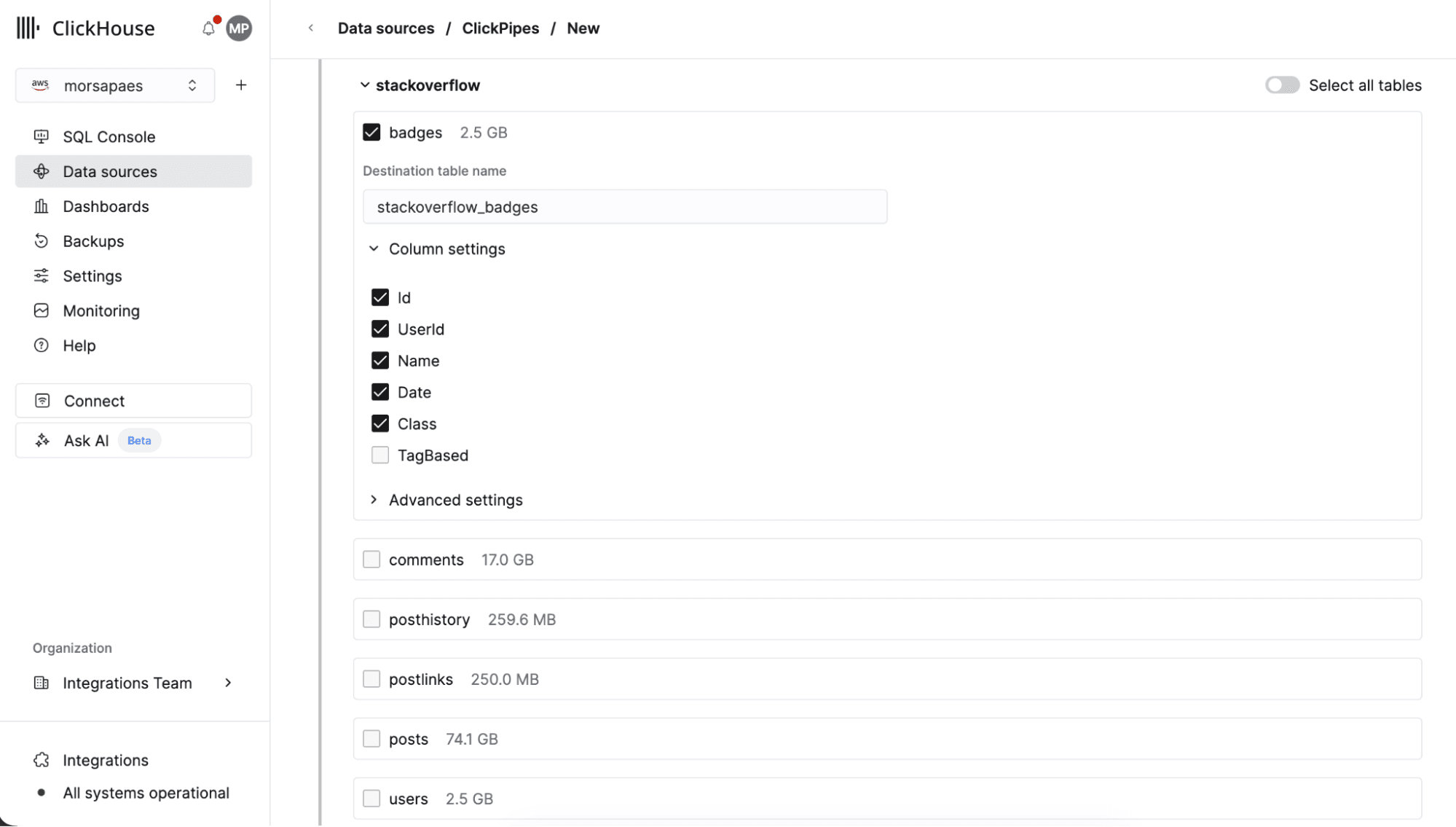
For each table, you can exclude specific columns, customize column mappings, and configure granular settings like how to handle NULL values. This eliminates the manual work of exporting tables one-by-one and gives you control over what data lands in ClickHouse without writing any code.
Implicit type mapping #
The connector handles BigQuery's type system automatically, including complex conversions that don't map directly to ClickHouse (e.g. DATE values stored as days-since-epoch become proper ClickHouse dates, BYTES columns get base64 decoded). With type mapping out of the way, you avoid writing error-prone conversion logic and investing time in debugging edge cases when data doesn't load correctly or queries return unexpected results.
Terraform and Open API support #
Although you can only sync full tables in Private Preview, for smaller tables it can be useful to do full periodic reloads. To support workflow automation and managing the ClickPipe as code, a new bigquery source type is available in the ClickPipes OpenAPI specification, as well as the ClickHouse Terraform Provider (3.8.3-alpha1+).
How does it work? #
Building a connector for a cloud data warehouse presents a unique challenge: moving (potentially very) large datasets efficiently while minimizing upstream costs. The new ClickPipes connector uses BigQuery's native export jobs (free!) to avoid incurring query processing charges.
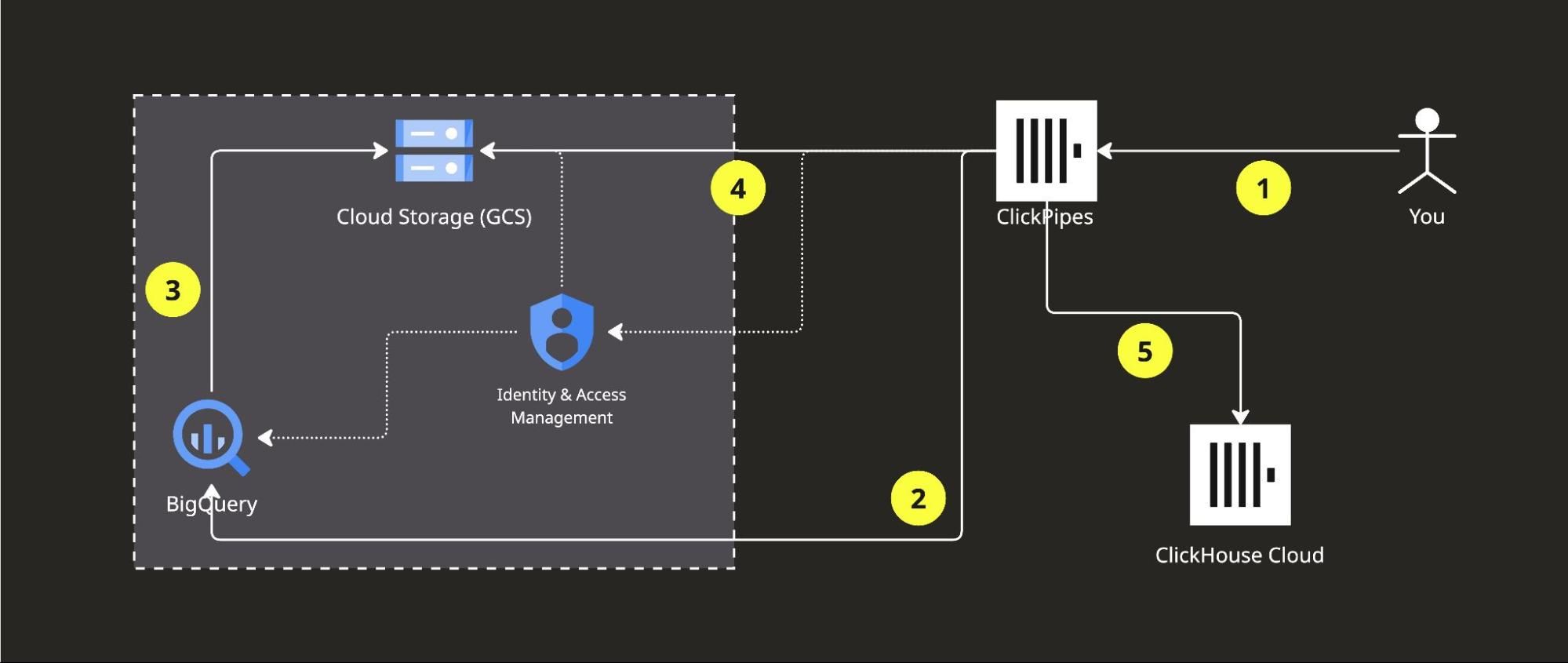
Bigquery ClickPipe: the user configures a ClickPipe to point to the desired tables in BigQuery, providing a service account key for authentication (1). A BigQuery job exports the data into an intermediate GCS bucket (2-3). ClickPipes reads from the staging bucket (4) and inserts data into ClickHouse Cloud tables (5). Authentication between services is managed via IAM.
Setup requirements:
- A BigQuery project with the dataset(s) you want to export tables from, and a ClickHouse Cloud account.
- A Google Cloud service account with BigQuery
dataViewerandjobUserpermissions, as well as GCSobjectAdminand bucketViewer permissions. - A dedicated GCS bucket for intermediate staging. In Private Preview, this bucket must be provisioned in your GCP account. In the future, ClickPipes will provision and manage the staging bucket.
Next up: incremental syncs #
After a successful onboarding, the most common request we get from customers is performing incremental loads to keep BigQuery and ClickHouse in sync. Unlike databases with transaction logs, BigQuery requires querying tables to detect changes, or using advanced ($$) features like time travel — all of which drive up costs. 📈 We're evaluating strategies for query-based CDC like timestamp-based incremental loads for append-only tables, partition-aware sync for time-partitioned data, and metadata-driven triggers to minimize query costs. If incremental syncs are critical for your use case, we’d love to work with you as a design partner.
In the meantime, we recommend using the Google Cloud Storage ClickPipe to continuously sync BigQuery data exports to ClickHouse Cloud, once the initial load via the BigQuery ClickPipes is completed. We’ll publish guides on how to implement this pattern in the next few weeks!
How to sign up for Private Preview? #
The BigQuery connector is in Private Preview and available upon request. Fill out this form to join the waitlist, or reach out to your ClickHouse Cloud account manager! We'll work through requests as soon as possible, and expect to reach out to you, worst case, within a few days of signing up.
We're actively looking for design partners to help shape this connector, in particular teams who need incremental syncs, or are planning large-scale BigQuery migrations. Your requirements and feedback will directly influence what we build next!