跳转到主内容
跳转到主内容

将 ClickHouse 与 Databricks 集成

ClickHouse Supported

ClickHouse Spark 连接器可以与 Databricks 无缝配合使用。本文指南介绍在 Databricks 中的特定平台配置、安装步骤以及使用模式。

为 Databricks 选择 API

默认情况下,Databricks 会启用 Unity Catalog,它会阻止注册 Spark catalog。此时,你必须使用 TableProvider API(基于 format 的访问)。

但是,如果你通过创建访问模式为 No isolation shared 的集群来禁用 Unity Catalog,则可以改用 Catalog API。Catalog API 提供集中式配置和原生 Spark SQL 集成。

Unity Catalog 状态推荐 API说明
Enabled(默认)TableProvider API(基于 format)Unity Catalog 阻止 Spark catalog 注册
Disabled(No isolation shared)Catalog API需要访问模式为 "No isolation shared" 的集群

在 Databricks 中安装

选项 1:通过 Databricks UI 上传 JAR

  1. 构建或下载运行时 JAR:

    clickhouse-spark-runtime-{{ spark_binary_version }}_{{ scala_binary_version }}-{{ stable_version }}.jar
    
  2. 将 JAR 上传到 Databricks 工作区:

    • 进入 Workspace → 导航到目标文件夹
    • 点击 Upload → 选择该 JAR 文件
    • 该 JAR 将存储在你的工作区中
  3. 在集群上安装该库:

    • 进入 Compute → 选择你的集群
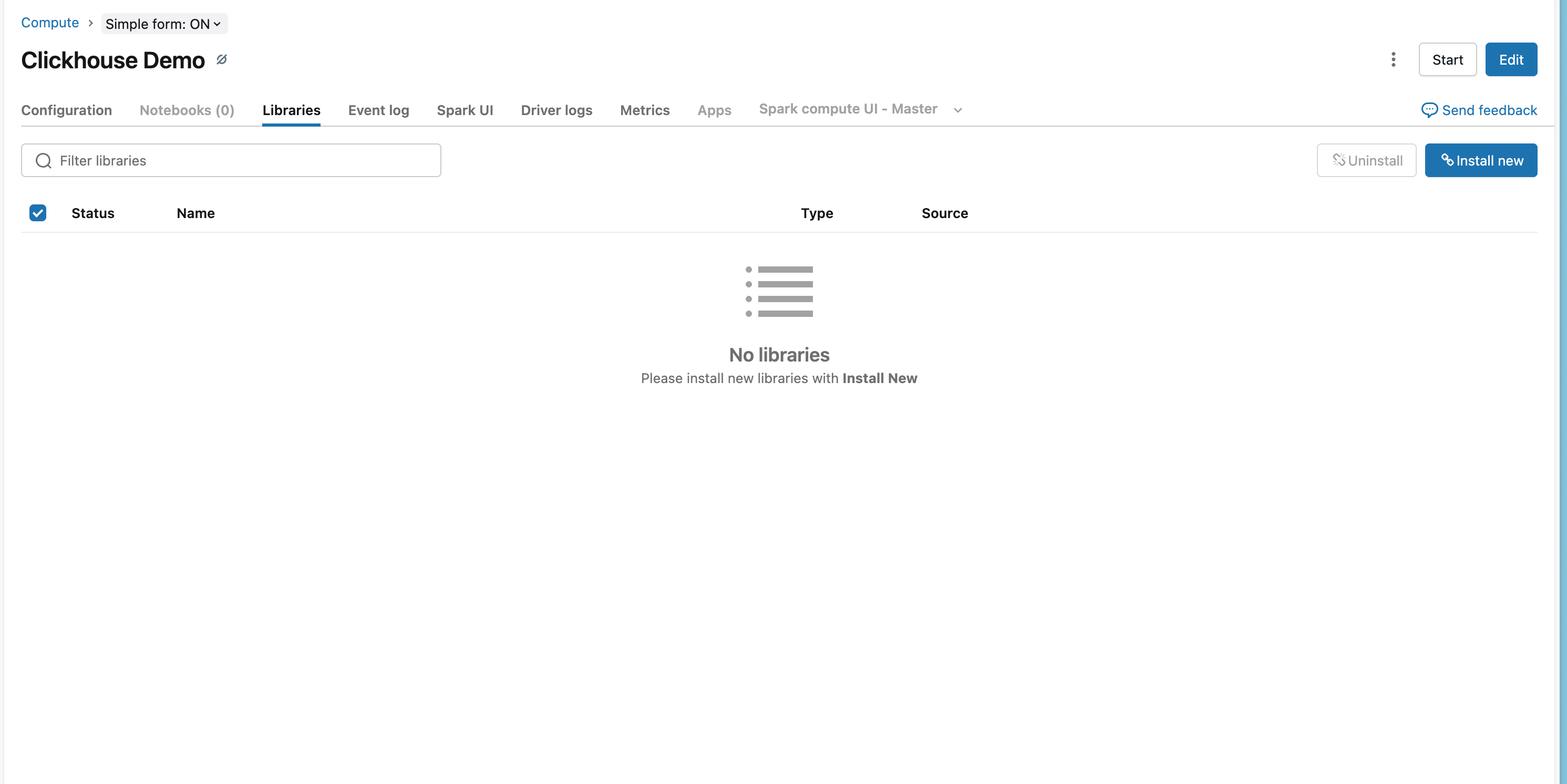
    • 点击 Libraries 选项卡
    • 点击 Install New
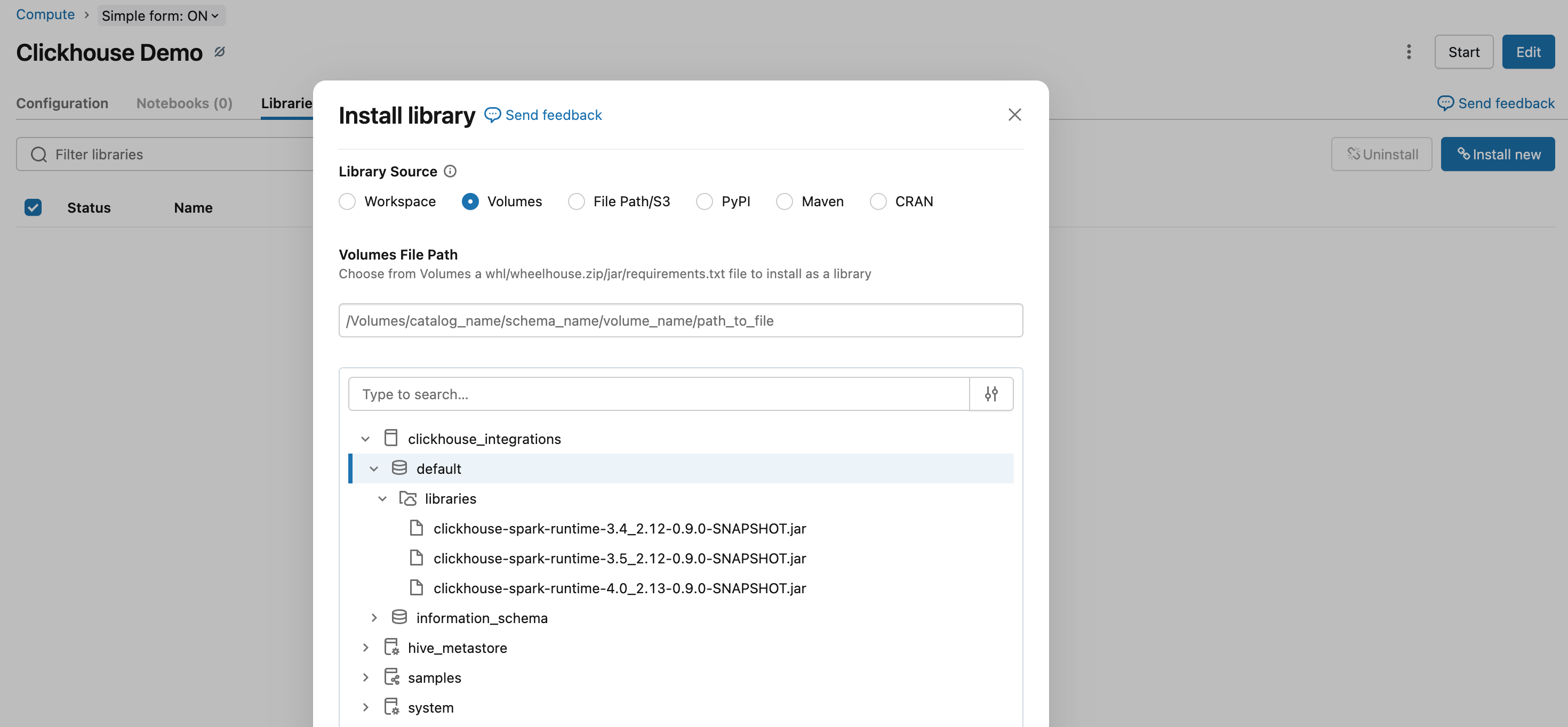
    • 选择 DBFSWorkspace → 导航到已上传的 JAR 文件
    • 点击 Install
Databricks Libraries 选项卡
从工作区卷安装库
  1. 重启集群以加载该库

选项 2:使用 Databricks CLI 进行安装

# Upload JAR to DBFS
databricks fs cp clickhouse-spark-runtime-{{ spark_binary_version }}_{{ scala_binary_version }}-{{ stable_version }}.jar \
  dbfs:/FileStore/jars/

# Install on cluster
databricks libraries install \
  --cluster-id <your-cluster-id> \
  --jar dbfs:/FileStore/jars/clickhouse-spark-runtime-{{ spark_binary_version }}_{{ scala_binary_version }}-{{ stable_version }}.jar

选项 3:Maven 坐标(推荐)

  1. 进入 Databricks 工作区:

    • 打开 Compute → 选择集群
    • 点击 Libraries 选项卡
    • 点击 Install New
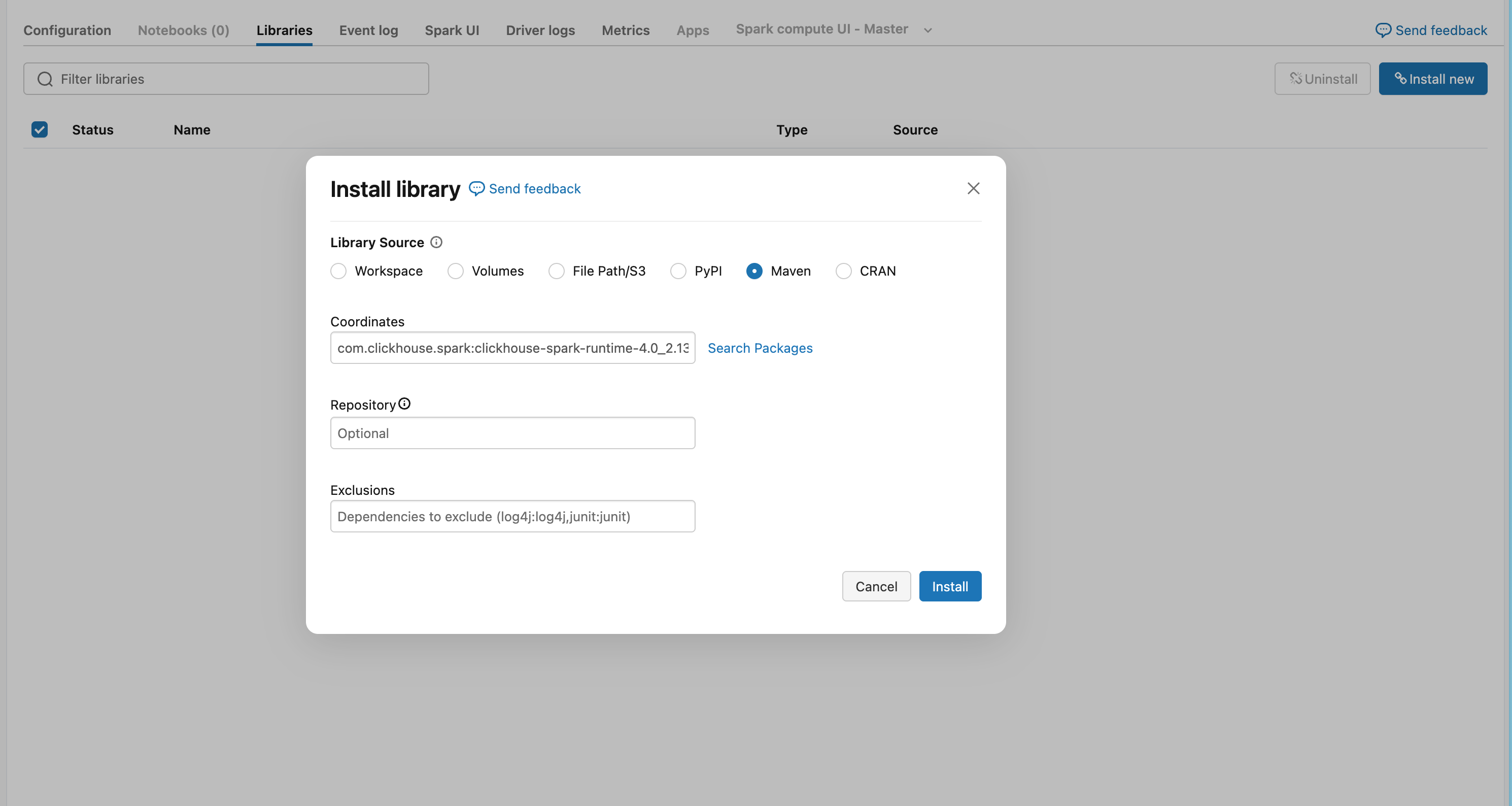
    • 选择 Maven 选项卡
  2. 添加 Maven 坐标:

com.clickhouse.spark:clickhouse-spark-runtime-{{ spark_binary_version }}_{{ scala_binary_version }}:{{ stable_version }}

<Image img={require('@site/static/images/integrations/data-ingestion/apache-spark/databricks/databricks-maven-tab.png')} alt="Databricks Maven 库配置" />

  1. 点击 Install,然后重启集群以加载该库

使用 TableProvider API

当启用了 Unity Catalog(默认)时,必须 使用 TableProvider API(基于格式的访问),因为 Unity Catalog 会阻止在 Spark catalog 中进行注册。如果你使用访问模式为 "No isolation shared" 的集群来禁用 Unity Catalog,则可以改用 Catalog API

读取数据

# Read from ClickHouse using TableProvider API
df = spark.read \
    .format("clickhouse") \
    .option("host", "your-clickhouse-cloud-host.clickhouse.cloud") \
    .option("protocol", "https") \
    .option("http_port", "8443") \
    .option("database", "default") \
    .option("table", "events") \
    .option("user", "default") \
    .option("password", dbutils.secrets.get(scope="clickhouse", key="password")) \
    .option("ssl", "true") \
    .load()

# Schema is automatically inferred
df.display()

写入数据

# Write to ClickHouse - table will be created automatically if it doesn't exist
df.write \
    .format("clickhouse") \
    .option("host", "your-clickhouse-cloud-host.clickhouse.cloud") \
    .option("protocol", "https") \
    .option("http_port", "8443") \
    .option("database", "default") \
    .option("table", "events_copy") \
    .option("user", "default") \
    .option("password", dbutils.secrets.get(scope="clickhouse", key="password")) \
    .option("ssl", "true") \
    .option("order_by", "id") \  # Required: specify ORDER BY when creating a new table
    .option("settings.allow_nullable_key", "1") \  # Required for ClickHouse Cloud if ORDER BY has nullable columns
    .mode("append") \
    .save()
注意

此示例假定已在 Databricks 中预先配置好 secret scope。有关设置方法,请参阅 Databricks 的 Secret 管理文档

Databricks 特有注意事项

机密管理

使用 Databricks 机密作用域(secret scope)安全存储 ClickHouse 凭证:

# Access secrets
password = dbutils.secrets.get(scope="clickhouse", key="password")

有关配置步骤,请参阅 Databricks 的机密管理文档

ClickHouse Cloud 连接

在 Databricks 中连接到 ClickHouse Cloud 时:

  1. 使用 HTTPS 协议protocol: httpshttp_port: 8443
  2. 启用 SSLssl: true

示例

完整工作流程示例

from pyspark.sql import SparkSession
from pyspark.sql.functions import col

# Initialize Spark with ClickHouse connector
spark = SparkSession.builder \
    .config("spark.jars.packages", "com.clickhouse.spark:clickhouse-spark-runtime-3.4_2.12:0.9.0") \
    .getOrCreate()

# Read from ClickHouse
df = spark.read \
    .format("clickhouse") \
    .option("host", "your-host.clickhouse.cloud") \
    .option("protocol", "https") \
    .option("http_port", "8443") \
    .option("database", "default") \
    .option("table", "source_table") \
    .option("user", "default") \
    .option("password", dbutils.secrets.get(scope="clickhouse", key="password")) \
    .option("ssl", "true") \
    .load()

# Transform data
transformed_df = df.filter(col("status") == "active")

# Write to ClickHouse
transformed_df.write \
    .format("clickhouse") \
    .option("host", "your-host.clickhouse.cloud") \
    .option("protocol", "https") \
    .option("http_port", "8443") \
    .option("database", "default") \
    .option("table", "target_table") \
    .option("user", "default") \
    .option("password", dbutils.secrets.get(scope="clickhouse", key="password")) \
    .option("ssl", "true") \
    .option("order_by", "id") \
    .mode("append") \
    .save()