수직 자동 스케일링
자동 수직 확장 is available in the Scale and Enterprise plans. To upgrade, visit the plans page in the cloud console.
Scale 및 Enterprise 티어 서비스는 CPU 및 메모리 사용량을 기준으로 자동 스케일링을 지원합니다. 서비스 사용량은 확장 여부를 결정하기 위해 일정 기간 동안 지속적으로 모니터링됩니다. 사용량이 특정 임계값을 초과하거나 그 아래로 떨어지면 수요에 맞게 서비스가 적절히 확장되거나 축소됩니다.
수직 자동 스케일링 설정
ClickHouse Cloud Scale 또는 Enterprise 서비스의 스케일링은 조직에서 Admin 역할을 가진 구성원이 조정할 수 있습니다. 수직 자동 스케일링을 설정하려면 서비스의 설정 탭으로 이동한 다음, 아래와 같이 최소 메모리와 최대 메모리, 그리고 CPU 설정을 조정하십시오.
단일 레플리카 서비스는 모든 티어에서 스케일링할 수 있는 것은 아닙니다.
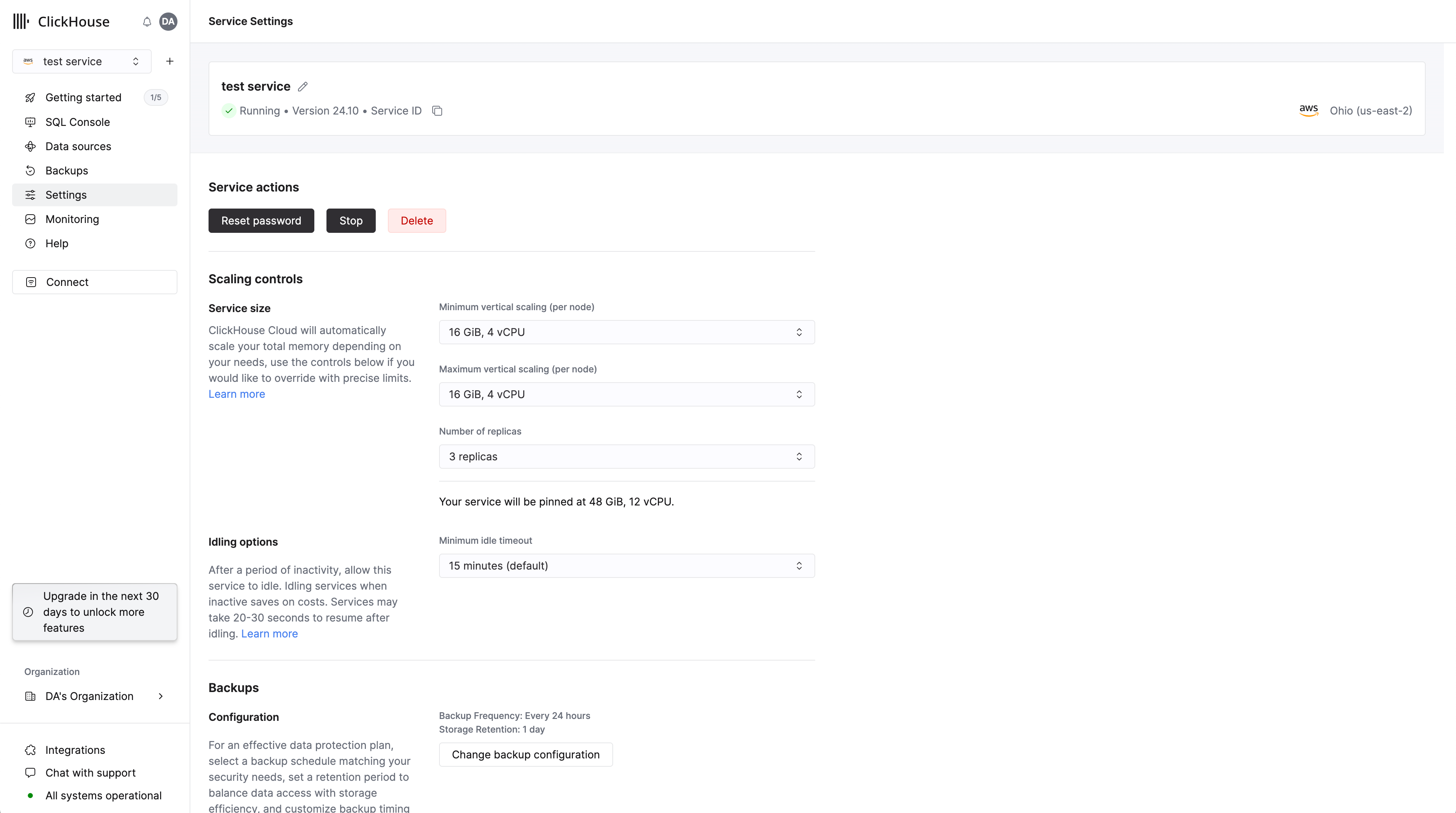
레플리카의 최대 메모리는 최소 메모리보다 큰 값으로 설정하십시오. 그러면 서비스가 해당 범위 내에서 필요에 따라 스케일링됩니다. 이러한 설정은 초기 서비스 생성 과정에서도 지정할 수 있습니다. 서비스의 각 레플리카에는 동일한 메모리 및 CPU 리소스가 할당됩니다.
이 값들을 동일하게 설정하여 사실상 서비스를 특정 구성에 "고정"할 수도 있습니다. 이렇게 하면 선택한 크기로 즉시 스케일링이 강제 적용됩니다.
중요한 점은 이렇게 하면 클러스터의 모든 자동 스케일링이 비활성화되며, 서비스가 이 설정을 초과하는 CPU 또는 메모리 사용량 증가로부터 보호되지 않는다는 것입니다.
Enterprise 티어 서비스의 경우 표준 1:4 프로필은 수직 자동 스케일링을 지원합니다. 사용자 지정 프로필은 수직 자동 스케일링이나 수동 수직 스케일링을 지원하지 않습니다. 그러나 이러한 서비스도 지원팀에 문의하면 수직으로 스케일링할 수 있습니다.
