스케일링 권장 사항
소개
데이터베이스 리소스를 자동으로 확장하려면 신중한 균형이 필요합니다. 확장을 너무 늦게 수행하면 성능 저하 위험이 커질 수 있고, 축소를 지나치게 공격적으로 수행하면 스케일링이 계속 반복적으로 오르내리는 현상이 발생할 수 있습니다.
ClickHouse Cloud는 두 개의 윈도우를 사용하는 권장 프레임워크와 대상 추적 CPU 권장 시스템을 결합해, 프로덕션 데이터베이스에 필요한 안정성을 유지하면서도 가변적인 워크로드에 대해 더 빠른 축소, 스케일링 반복 현상 최소화, 그리고 상당한 인프라 비용 절감을 가능하게 합니다.
CPU 기반 스케일링
CPU 스케일링은 목표 추적(target tracking)을 기반으로 하며, 사용률을 목표 수준으로 유지하는 데 필요한 정확한 CPU 할당량을 계산합니다. 현재 CPU 사용률이 정해진 범위를 벗어날 때에만 스케일링 작업이 트리거됩니다:
| Parameter | Value | Meaning |
|---|---|---|
| 목표 사용률 | 53% | ClickHouse가 유지하려는 사용률 수준 |
| 상한 임계값 | 75% | CPU가 이 임계값을 초과하면 스케일 업을 트리거합니다 |
| 하한 임계값 | 37.5% | CPU가 이 임계값 아래로 떨어지면 스케일 다운을 트리거합니다 |
추천기는 과거 사용량을 기준으로 CPU 사용률을 평가하고, 다음 공식을 사용해 권장 CPU 크기를 결정합니다:
CPU 사용률이 할당된 용량의 37.5%–75% 범위에 있으면 스케일링은 수행되지 않습니다. 이 범위를 벗어나면 추천기가 사용률을 다시 53%로 맞추는 데 필요한 정확한 크기를 계산하고, 이에 맞춰 서비스가 스케일링됩니다.
예시
4 vCPU가 할당된 서비스의 사용량이 3.8 vCPU(~95% 사용률)까지 급증해 75% 상한 기준을 넘었다고 가정합니다.
추천기는 3.8 / 0.53 ≈ 7.2 vCPU로 계산한 뒤, 다음으로 사용 가능한 크기인 8 vCPU로 올림합니다. 이후 부하가 줄어 사용량이 37.5%(1.5 vCPU) 아래로 떨어지면, 추천기는 이에 비례해 다시 축소합니다.
메모리 기반 권장 사항
ClickHouse Cloud는 서비스의 실제 사용 패턴을 기반으로 메모리 크기를 자동으로 권장합니다. 추천기는 lookback 윈도우의 사용량을 분석하고, 사용량 급증에 대응하며 메모리 부족(OOM) 오류를 방지할 수 있도록 여유분을 추가합니다.
추천기는 다음 3가지 지표를 확인합니다:
- 쿼리 메모리: 쿼리 실행 중 사용된 최대 메모리
- 상주 메모리: 프로세스 전체가 보유한 최대 메모리
- OOM 이벤트: 최근 쿼리 또는 레플리카에서 메모리 부족이 발생했는지 여부
헤드룸 계산 방식
쿼리 및 상주 메모리의 경우, 추가되는 헤드룸의 크기는 사용량의 예측 가능성에 따라 달라집니다:
- 안정적인 사용량(변동이 낮음): 1.25배 — 사용량이 일정하고 예기치 않게 급증할 가능성이 낮으므로 헤드룸을 더 많이 추가합니다
- 급격히 변하는 사용량(변동이 높음): 1.1배 — 이미 변동 폭이 큰 워크로드에 과도하게 프로비저닝하지 않도록 헤드룸을 더 적게 추가합니다
OOM 이벤트가 감지되면 추천기는 서비스가 복구에 필요한 메모리를 충분히 확보할 수 있도록 더 적극적인 1.5배를 적용합니다.
최종 권장 사항
시스템은 모든 신호 중 가장 높은 값을 사용합니다:
두 개의 윈도우 추천기
단일 윈도우를 사용하는 대신, ClickHouse Cloud는 서로 다른 시간 범위를 가진 2개의 lookback 윈도우를 사용합니다:
- 작은 윈도우(3시간): 최근 사용 패턴을 포착하여 더 빠른 축소을 가능하게 합니다
- 큰 윈도우(30시간): 여러 차례에 걸쳐 점진적으로 scale-up하는 대신, 더 긴 lookback 윈도우에서 확인된 최대 사용량까지 한 번에 scale-up하도록 합니다. 이는 스케일링에 시간이 걸리고 로컬 cache를 무효화하기 때문에 매우 중요합니다. 따라서 한 번에 scale-up하는 편이 더 안전합니다.
각 윈도우는 메모리와 CPU 분석을 모두 사용하여 독립적으로 권장값을 생성합니다. 그런 다음 시스템은 아래 그림과 같이 각 윈도우가 제안하는 스케일링 방향에 따라 이러한 권장값을 병합합니다:
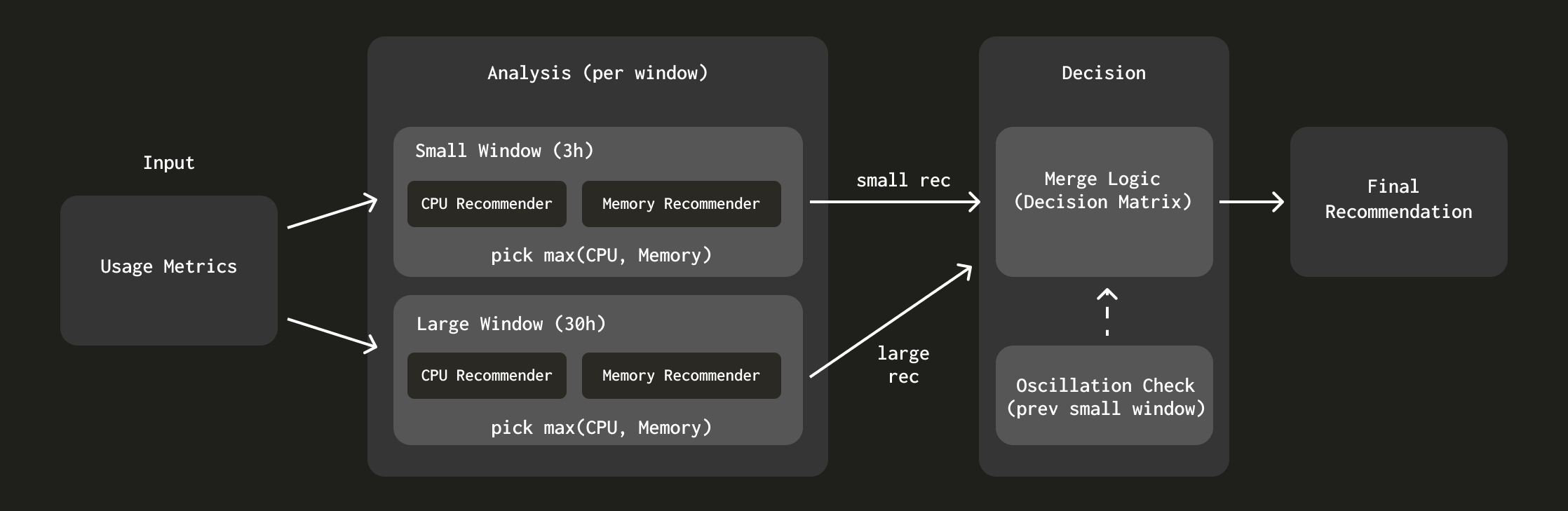
추천기의 설계 결정에 대해 더 자세히 알아보려면 "ClickHouse를 위한 더 똑똑한 자동 스케일링: 두 개의 윈도우 접근 방식 "을 참조하십시오.
